
Technology·News & analysis
Microsoft says Windows 11 now runs up to 40% faster on 8 GB PCs
Microsoft tuned how Windows 11 handles memory on low-RAM PCs. It claims up to 20% better responsiveness and up to 40% faster multitasking, and says a full Task Manager is fine.

Tide
Wave
Sci-fi
3/10
Reality
Shipping
A desk, a drawer and an operating system tidying both.How we rate
Memory prices are rising, so many people will keep an 8 GB PC longer than they planned.
Microsoft says it tuned Windows 11 for exactly that machine, with up to 20% better responsiveness and up to 40% faster multitasking in its own tests. The update is in Windows 11 26H2, build 26300.9818 or later, plus app updates through the Microsoft Store. The numbers come from Microsoft's lab, so your PC may differ.
What to know
- Microsoft says Windows 11 on an 8 GB PC is now up to 20% more responsive, and multitasking is up to 40% faster in its own lab test.
- Windows can now keep up to 2 GB more active data in memory instead of moving it to slower storage, and Edge tabs fall asleep after 15 minutes instead of 2 hours.
- Microsoft also says a mostly full Task Manager is normal, and the real test is whether the PC stays responsive.
- The changes come as memory prices climb and Microsoft's Windows OEM and devices revenue fell 22% last quarter.
Microsoft says Windows 11 now runs better on PCs with 8 GB of memory, with up to 20% more responsiveness and up to 40% faster multitasking. Memory is getting pricey, so the fun question is: can software make a small PC feel bigger?
First, what's RAM and why 8 GB?
RAM is your PC's short-term memory. It holds the apps and files you are using right now, so they open fast. When RAM fills up, Windows moves some of it to the drive, which is much slower.
Many everyday PCs ship with 8 GB. Newer Copilot+ PCs, Microsoft's line of AI-ready laptops, need at least 16 GB. With AI data centers soaking up memory, RAM prices keep climbing, so lots of people will stay on 8 GB longer than they hoped.
What did Microsoft actually change?
Microsoft says it is working on three things. It wants Windows to make better use of the memory it has, protect the actions that must feel instant, and make key apps need less memory. Executive Vice President Pavan Davuluri wrote the update. The company says memory work has been a quality focus since July.
Here are the headline claims, all from Microsoft's own lab:
- Up to 20% more responsive on 8 GB PCs.
- Up to 40% faster multitasking in one demanding test. It opened 20 Edge tabs, a 4K video, large Word, PowerPoint and Excel files, Outlook and File Explorer one after another. Microsoft compares this with the January 2026 builds.
- Up to 2 GB more active data kept in memory instead of moved to slower storage, so an app or tab you left open is less likely to reload.
Why does a full Task Manager not mean trouble?
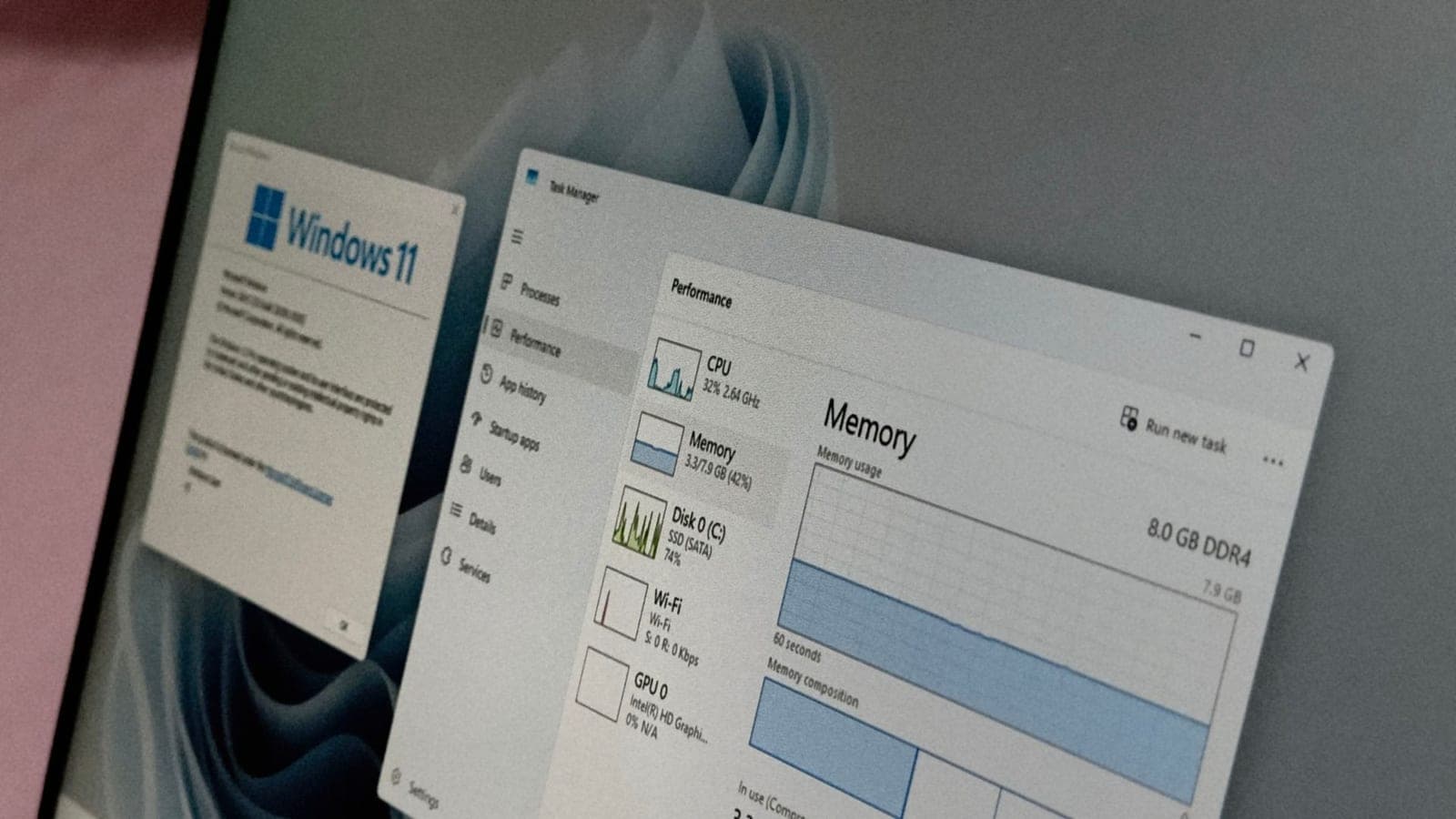
Open Task Manager on an 8 GB PC and you may see most of the memory in use. Microsoft says that does not mean your PC is struggling.
It uses a desk and a drawer. The desk is RAM, and everything you are working on sits there within reach. The drawer is your drive, and fetching from it is slower. "A full desk is a good thing," Davuluri wrote, because it means what you use is right there. Windows fills spare memory with useful apps and data, then gives it back when you need it.
His test is simple: "The real test is whether your PC stays responsive, not how much memory remains unused."
A test on virtual machines, which are pretend PCs that run inside a real one, points the same way. The same Windows 11 version was started with 4, 8 and 16 GB of RAM. The more memory Windows got, the more it used.
The 16 GB machine used about 1.3 GB more than the 4 GB one right after a restart. On the 8 GB machine, 2.9 GB was in use and 5.1 GB was available.
What is memory compression?
Windows has squeezed data for years. It folds less-active data into a smaller form so it can stay on the desk instead of going to the drawer.
Microsoft says it retuned this for 8 GB PCs: how much to compress, when to use the drive, and when to bring something back. That is where the "up to 2 GB more" claim comes from.
How does Windows feel faster in everyday moments?
Microsoft lists the actions people repeat all day: opening Start, searching, right-clicking, opening Settings, launching Snipping Tool and opening File Explorer. Compared with the January 2026 update, it says they respond up to 20% faster.
How? Windows briefly puts your request first and backs off background jobs, such as search indexing, while you are active. That matters most in the first minutes after a restart from an update, when Windows still has setup work to finish.
Other small tricks add up:
- Edge: when the browser is already running in the background, Windows connects to it directly instead of looking for it first. Microsoft says Edge can open up to 33% faster.
- Teams: it can turn on Efficiency Mode by default on 8 GB PCs, a setting that makes an app use fewer resources. Microsoft says it helps Teams launch up to 20% faster.
- Video calls: Teams can lower camera resolution during meetings to save processor power for audio.
Where does the memory saving come from?
Microsoft says Windows, Edge and Microsoft 365 apps together cut committed-memory growth by up to 900 MB in its multitasking tests. Committed memory is the amount Windows has promised to apps.
- Microsoft 365 apps: Word, PowerPoint, Excel and Outlook add up to 360 MB in savings, partly from organizing memory more efficiently.
- Widgets: on PCs with 8 GB or less, Widgets now loads only when you open it. That saves roughly 200 MB while it is closed.
- Edge tabs: inactive tabs now go to sleep after 15 minutes by default, down from 2 hours.
- Other developers: the improvements are open to third-party apps. Microsoft says WhatsApp is seeing a double-digit memory improvement in its Windows app.
In real life Your browser has 20 tabs open and you walk away for lunch. After 15 minutes, the tabs you are not reading go to sleep and hand their memory back. When you click one, it wakes up.
How did Microsoft test it?
The company says it tests fixes across more than 20,000 PCs in its labs, including current 8 GB models. It uses automated workloads based on browsing, Microsoft 365 work, video calls and background downloads. It also uses high-speed cameras to time how long a click takes to show a result on screen.
It says it checks real-world data after release to see if the gains hold. It also points people to Feedback Hub, where reports and upvotes help decide what to fix first.
Keep the fine print in mind. These are lab numbers, labeled "up to," and compared with Microsoft's own January 2026 builds. They show a direction, not a promise for your laptop.
Does a newer processor matter too?
Microsoft says yes. In testing it commissioned from a third party, a 2026 Dell XPS 13 with 8 GB delivered up to 94% faster multi-core processor performance than a 2021 model with 8 GB.
The same 2026 PC performed about as well as a 2021 model with 16 GB across processor performance, web browsing, AI web tasks such as background blur and face detection, and 4K video export. Microsoft's conclusion: the complete PC, not memory capacity alone, shapes the experience. It still says heavier work, such as 3D modeling or advanced video editing, benefits from 16 GB or more.
Why now?
Memory prices are one reason the topic is hot. Microsoft's own numbers add context: it reported a 22% drop in Windows OEM and devices revenue in its fiscal first quarter of 2027, while adjusted earnings reached $36.4 billion, up 18%. OEM revenue is what PC makers pay Microsoft for Windows on new machines. When PCs cost more, fewer people buy new ones.
Microsoft does not link the update to those numbers. But making the PCs people already own feel quicker is a sensible move when the next upgrade costs more than it did last year.
How do you get it?
The improvements are in Windows 11 26H2, build 26300.9818 or later. Some arrive through app updates or the Microsoft Store, so keep Microsoft's own apps updated. Check Settings, then Windows Update, to see which build you have.
What it means for you
- If you own an 8 GB PC: install the latest Windows 11 update and update your Microsoft apps. You may notice faster restarts, less reloading of tabs and quicker Start and File Explorer.
- If Task Manager looks scary: stop worrying about a high percentage by itself. Watch how the PC behaves instead.
- If you plan to upgrade: 8 GB is fine for everyday work, but video editing, 3D work and Copilot+ features want 16 GB or more.
- If you use Edge: tabs now sleep after 15 minutes, so a tab you left alone may take a moment to wake up.
The bottom line
Microsoft is telling owners of 8 GB PCs that software can help while memory is expensive. The gains are lab numbers, but the changes are real and arrive in an update. Install it, then judge by how your own PC feels.
Key facts
- Claimed gain
- Up to 20% more responsive, up to 40% faster multitasking
- Extra data kept in RAM
- Up to 2 GB
- Edge tab sleep
- 15 minutes (was 2 hours)
- Where to get it
- Windows 11 26H2, build 26300.9818 or later
- Microsoft lab size
- Over 20,000 PCs
Got questions?
Quick answers, plain wordsWhat did Microsoft change for 8 GB PCs?
Microsoft tuned how Windows 11 compresses data and uses the drive, protects quick actions such as opening Start, and trims memory use in Windows, Edge and Microsoft 365 apps. It says an 8 GB PC is up to 20% more responsive and multitasking is up to 40% faster in its lab test.
Are those numbers true on my PC?
Not necessarily. They come from Microsoft's own lab test, compared with the January 2026 builds, on one demanding scenario. Your apps, drive and processor will change the result.
How do I get the update?
The improvements are in Windows 11 26H2, build 26300.9818 or later. Microsoft also says some of them arrive through app updates or the Microsoft Store, so keep its apps up to date.
Why does Task Manager show most of my RAM in use?
Windows uses spare memory to keep apps and data ready, then hands it back when another app asks. Microsoft says a full desk is a good thing, and the real test is whether the PC stays responsive.
What does memory compression mean?
Windows folds less-active data into a smaller form so it can stay in RAM instead of moving to the slower drive. Microsoft says it retuned how much to compress and when to use the drive on 8 GB PCs.
Is 8 GB enough for Windows 11 now?
Microsoft says 8 GB is a great fit for everyday things. It says demanding jobs such as 3D modeling, advanced video editing or large-scale data processing do better with 16 GB or more.
Do I need a new PC for AI features?
For Copilot+ PCs, yes in the sense that they need at least 16 GB of RAM. The update is aimed at regular 8 GB machines and does not change that requirement.
Why does this come as RAM gets more expensive?
AI data centers are soaking up memory, which has pushed prices up. Microsoft has not tied the update to prices in its post, but the timing matters for anyone who now keeps an old PC longer.
What did the new Dell test show?
In testing Microsoft commissioned, a 2026 Dell XPS 13 with 8 GB delivered up to 94% faster multi-core processor performance than a 2021 model with 8 GB. It performed about as well as a 2021 model with 16 GB across several tests.
Does Microsoft say more is coming?
Yes. Memory optimization is one of the areas it committed to this summer, and it says the improvements available today are an important step with more focus planned over the next few months.
SourcesWindows Experience Blog
Topics and tagsMicrosoft, microsoft, windows 11, memory
Go deeper
Related stories
Windows will stop mounting ReFS-formatted USB drives in January
Microsoft is phasing out ReFS on removable drives. Windows now logs a warning when it spots one, and from the January 2027 security update it will refuse to mount them unless an admin says otherwise.
Windows 11's October update can lock Smart App Control and trip work Wi-Fi
Microsoft's October 13 update for Windows 11 can leave Smart App Control stuck off, and a security change inside it is blocking some office and campus Wi-Fi sign-ins.
Windows 11 26H2 feels faster, but an audio bug is crashing some apps
Microsoft's annual Windows update turns on months of speed work for many PCs, but the company has confirmed that a September update can crash apps that use built-in Dolby Digital audio.
More in brief
- Suspected Russian hackers used old iPhone and Android bugs on fake sitesNov 5
- Tencent's Hy4 can now see images and operate a computerNov 5
- SpaceX picks Qualcomm chips for Starlink Mobile's US 5G networkNov 4
- VMware brings back a low-cost server product called vSphere ExpressNov 4
- Enough Phone brings a 5.3-inch Android phone to KickstarterNov 4
- Google will switch off AI and Search for school accounts until schools opt inNov 3