
AI·News & analysis
Google brings Gemini Live to Apple CarPlay for hands-free chats
Google's Gemini app is now rolling out on Apple CarPlay, so iPhone drivers can talk to Gemini Live about email, calendar and plans without touching the phone.

Tide
Wave
Sci-fi
4/10
Reality
Shipping
A chatty co-pilot that never asks for gas money.How we rate
Google announced on November 11 that the Gemini app is now rolling out on Apple CarPlay, letting iPhone drivers hold spoken, back-and-forth Gemini Live conversations on the car screen.
It connects to Gmail and Google Calendar, so you can catch up on email or check your day by voice. The rollout is global, in every language Gemini Live supports. Chats sync to your iPhone, and the app update may reach people over the next few days.
What to know
- Google announced on November 11, 2026 that the Gemini app is coming to Apple CarPlay, with Gemini Live conversations on the car screen.
- The rollout is global, for all iPhone users, in every language Gemini Live supports.
- You need the latest Gemini app, microphone permission and at least one Gemini Live chat on the phone before the car icon works.
- Car chats sync to the Gemini app on the iPhone, so summaries and notes are waiting when you park.
Google announced on November 11 that the Gemini app is coming to Apple CarPlay. That means iPhone drivers can now talk to Gemini Live on the car screen. The fun question: what do you actually say to an AI during a commute?
What did Google announce?
Google is bringing the Gemini app to CarPlay, the system that shows a few iPhone apps on a car's built-in screen. The headline feature is Gemini Live, the spoken-conversation mode of Gemini.
Google says the goal is a "conversational driving companion" that minimizes distraction. Its own pitch starts with a simple fact: for millions of people, the daily commute averages about an hour behind the wheel.
That hour has long been used for music, podcasts and directions. Google wants to add a fourth use: talking things through.
How does it work on the car screen?
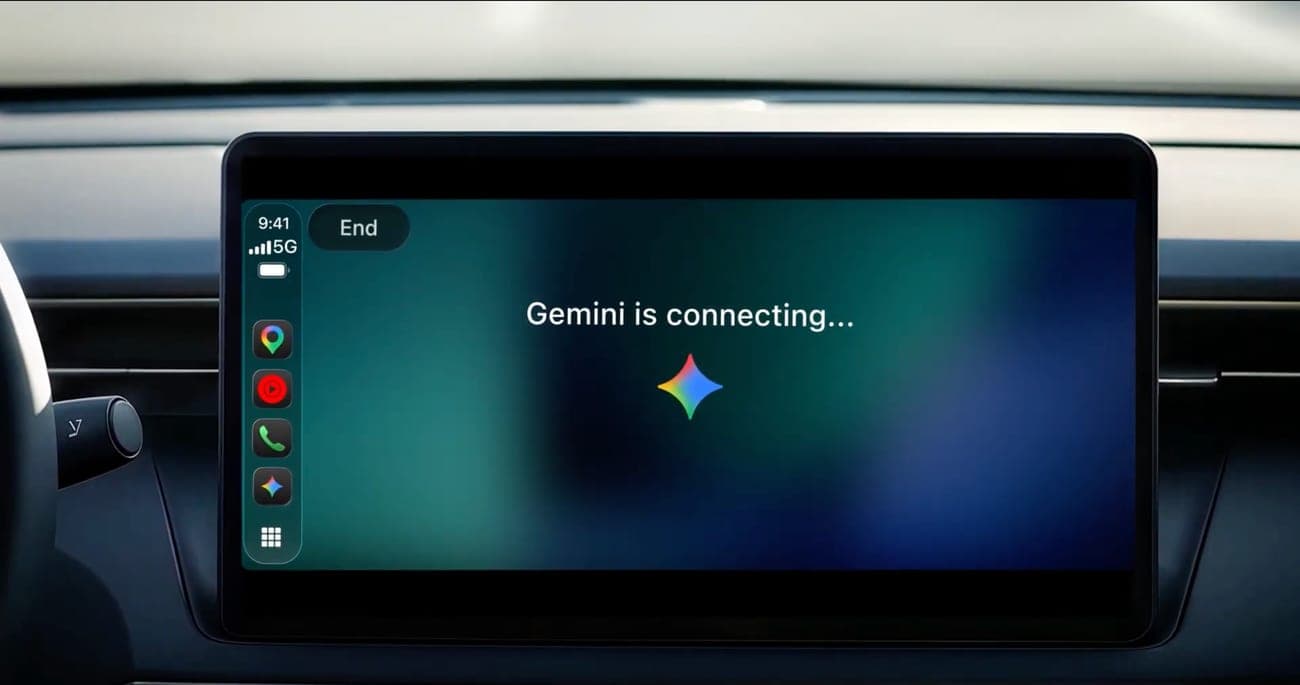
The screen is deliberately plain. A moving waveform shows whether Gemini is listening, thinking or answering. There are two buttons in the top-left corner, End and Mute.
You open it by tapping the Gemini icon on the CarPlay display or on the side rail. Then you pick one of two paths:
- Pick up where you left off: continue a recent chat.
- Start fresh: begin a new conversation.
You talk at your own pace. You can interrupt Gemini to add a detail, switch topics, or pause when you need to focus on an exit.
In real life You get in the car, tap the Gemini icon and say, "What does my day look like?" Gemini reads your calendar out loud, and you ask when you need to leave for the 10am meeting.
What can you ask it?
Google lists four everyday uses. The first two lean on Google's work apps, which the company calls Workspace. These are tools like Gmail and Google Calendar.
- Get ready for the day: ask what is on your calendar, when to leave for the next appointment, or rehearse what you want to say. Google suggests "Help me prep for my 10am with the design team."
- Talk through your inbox: ask for a daily brief, catch up on unread email, get a summary of a long thread and talk through a quick reply by voice.
- Explore local spots: ask for a quick lunch place in the area you are heading to, or the backstory of a landmark.
- Think out loud: practice a presentation, prepare for a tough conversation or break down a topic you are curious about.
Google's own example prompt for the last one is a good picture of the tone. It asks Gemini to play a skeptical VP and challenge a Q4 pitch. A quiet car cabin is, in Google's words, one of the best places to think out loud.
Who gets it, and when?
By the numbers: the rollout is global and starts on November 11, 2026. It is for all Gemini users on iOS, in every language that Gemini Live supports.
Rollouts take time. Google's wording says the feature is rolling out starting today, so the update may take a little while to reach your phone. If you do not see the icon in your car yet, check for an app update later.
What do you need to set it up?
There are three steps, and the third one is easy to miss:
- Update the Gemini app: install the latest version on your iPhone.
- Allow the microphone: turn on microphone permission for Gemini.
- Use Gemini Live once on the phone: Google says you must have used it at least once before the car version works.
After that, connect the iPhone to the car and tap the Gemini icon on the CarPlay screen. Then start a new chat or open a recent one.
Do the chats stay in the car?
No. Google says CarPlay conversations sync automatically with the Gemini app on your iPhone. Sync means the same chat shows up on more than one device.
So a summary, a note or a brainstorm from the morning drive is waiting in your chat history when you park. You can read it, copy a line from it or keep going on the phone.
Why it matters: driving is a time when you cannot type. Anything you want to remember has to be spoken, so having the chat saved on the phone turns a loose idea into something you can find later.
How is this different from Gemini in Maps?
This is the second recent step for Gemini on CarPlay. In October, Google added Gemini to Google Maps on CarPlay. That version helps with places and routes. You can ask several follow-up questions about a destination, such as the weather, whether it will be crowded or how to avoid tolls.
The new app is wider. It is a stand-alone assistant for general conversation, email and planning, not just navigation. Think of Maps as a co-pilot who knows the road, and the new app as one who also knows your calendar.
Google also says this follows its rollout on Android Auto and on cars with Google built in. So iPhone and Android drivers now have the same kind of talking assistant.
Why can this happen now?
CarPlay used to be tightly controlled by Apple. Apple began allowing third-party voice-based conversational apps to connect to CarPlay with iOS 26.4, which came out in March. Without that change, an app like Gemini could not sit on the car screen as its own voice assistant.
Reports say other AI chatbot apps reached CarPlay first, which makes Gemini a late arrival. Google's argument is different from being first. Its pitch is that your email and calendar are probably already in Google's apps, so the assistant knows your day.
What are the open questions?
The catch: Google puts a footnote on the daily brief feature. That points to limits by plan or region. One regional report says the daily brief is not available in the European Economic Area, so drivers there may get the chat without that part.
There is also no word on whether the more personal Android Auto features, announced in October, will come to CarPlay. Google has not said so in this announcement.
Finally, the usual driving advice applies. A voice chat is easier on the eyes than a screen, but it still takes some of your attention. Park for anything tricky, and save the long role-play pitch for a red light or a parking lot.
What it means for you
- If you drive with an iPhone: update the Gemini app, allow the microphone and start one Gemini Live chat on the phone. Then look for the icon in your car.
- If you use Gmail and Calendar: you can ask for your day and your unread email by voice, without picking up the phone.
- If you are in Europe: expect the chat to work, but do not count on the daily brief.
- If you already use another assistant on CarPlay: you can now compare the two on the same road.
The bottom line
Google has put the full Gemini Live conversation into Apple's car screen, and it is rolling out to every iPhone user at once. It is a talking assistant that knows your email and your calendar, and it saves the chat on your phone.
It arrives after Android Auto and after Gemini in Maps. The real test is the one Google describes itself: does a spoken chat make the commute more useful without taking your eyes off the road?
Key facts
- Announced
- November 11, 2026
- Where
- Apple CarPlay, worldwide
- Who gets it
- All Gemini users on iPhone
- Needs
- Latest app, mic access, one Gemini Live chat
- Connects to
- Gmail and Google Calendar
Got questions?
Quick answers, plain wordsWhat is Gemini on CarPlay?
It is the Gemini app running on the screen of a car that supports Apple CarPlay. You talk, Gemini talks back, and the whole thing is built around voice. Google calls it a conversational driving companion that tries to keep distraction low.
What is Apple CarPlay?
CarPlay is Apple's system for showing a few iPhone apps on a car's built-in screen. Your phone does the work, and the car screen and speakers act as the display. You connect by cable or wirelessly, depending on the car.
What is Gemini Live?
Gemini Live is the part of the Gemini app made for spoken conversation. You can talk naturally, interrupt the answer, change the subject or pause. On CarPlay it is the main way you use Gemini.
Is Gemini on CarPlay available worldwide?
Google says the rollout is global, starting November 11, 2026, for all Gemini users on iOS in every language Gemini Live supports. A rollout still takes time, so the update may not show up on every phone on day one.
What do I need to set it up?
Update the Gemini app on your iPhone, turn on microphone permission, and use Gemini Live on the phone at least once. Then connect the phone to the car and tap the Gemini icon on the CarPlay display or side rail.
Can Gemini read my email in the car?
Yes, through Gmail. Because Gemini connects with Gmail and Google Calendar, you can ask it to catch you up on unread email, summarize a long thread and talk through a quick reply by voice.
Do my car chats show up on my phone?
Yes. Google says CarPlay conversations sync automatically with the Gemini app on your iPhone. Summaries, notes and brainstorms are in your chat history when you park.
Does Gemini work in Google Maps on CarPlay too?
Yes, but that is a separate feature. In October Google added Gemini to Google Maps on CarPlay, for questions about places and routes. The new Gemini app is a standalone app for general conversation.
Is the daily brief available everywhere?
Google puts a footnote on the daily brief feature, which suggests limits by plan or region. One regional report says it is not offered in the European Economic Area. Check the Gemini app in your country to be sure.
Is Gemini already on Android Auto?
Yes. Google says the CarPlay launch follows its rollout on Android Auto and on cars with Google built in, so iPhone drivers now get a version of the same assistant.
SourcesGoogle
Topics and tagsGoogle, Apple, Smartphones, gemini
Earlier on this story
Related guide
Guide, 8 minHow to use Gemini: Live camera help, Skills and Android scam protectionUse Gemini Live with your camera, prepare for Gems turning into Skills, and switch on the opt-in scam protection in Google Messages.Related stories

Google's Gemini 4 Hydrogen beats pricier Argon on one key score
Google released Gemini 4 Hydrogen, a fast model for everyday coding and agent work. It costs $1.50 per million input tokens and reaches the Gemini app and Search today.

Google will switch off AI and Search for school accounts until schools opt in
Google says Gemini and Search will be off for K-12 student accounts until administrators turn them on, and a school that wants no AI loses Search too.

Four Gemini 4 Argon agents beat Minecraft with no human help
Google DeepMind researchers gave four AI agents one goal, defeat the Ender Dragon, and no game tools. Twenty-seven hours and 605 deaths later, the dragon fell.
More in brief
- Tesla opens Cybercab orders at $29,990, plus $299 a month to drive itNov 14
- Apple Sports adds UFC with live stats for every fight on the cardNov 13
- LangChain raises $300 million at a $3 billion valuation for AI agentsNov 13
- SignDrop, a new Windows zero-day, gives attackers full System rightsNov 13
- Microsoft's AI Frontiers research group is over, says co-founder John LangfordNov 13
- BYD apologizes after wrong wheels ship on its Great Tang SUVNov 13