
Technology·News & analysis
Apple Sports adds UFC with live stats for every fight on the card
Apple's free Sports app now covers UFC, starting with UFC 334 this Saturday. You get fight-by-fight numbers, a strike map and lock screen updates.

Tide
Wave
Sci-fi
3/10
Reality
In your hands
A scoreboard that counts punches while you blink.How we rate
Apple added UFC to its free Sports app on Thursday, starting with UFC 334 on Saturday.
Every bout on the card gets live stats such as strikes, takedowns, knockdowns and control time, plus an animated strike map. Live Activities carry the fight to the iPhone lock screen and Apple Watch. The app shows data only, so watching still requires Paramount+, and it remains iPhone only.
What to know
- Apple Sports now covers UFC, starting with the UFC 334 card on Saturday, November 14.
- Every bout gets live stats: total strikes, significant strikes, takedowns, knockdowns, submission attempts and control time.
- An animated strike map shows where hits land, and Live Activities put the fight on your lock screen and Apple Watch.
- The app is free, iPhone only, and now comes preinstalled when you set up a new iPhone from scratch.
Apple Sports now follows UFC. The free iPhone app will track every fight on a card live, starting with UFC 334 this Saturday.
That's the news. Now the fun part: how do you follow a fight that can end in one punch, using an app that has to keep up?
What did Apple add?
Apple added the Ultimate Fighting Championship (UFC), the biggest mixed martial arts league, to the Apple Sports app. It went live on Thursday, November 12.
The app covers the whole card, from the early prelim fights to the main event. For each bout you get:
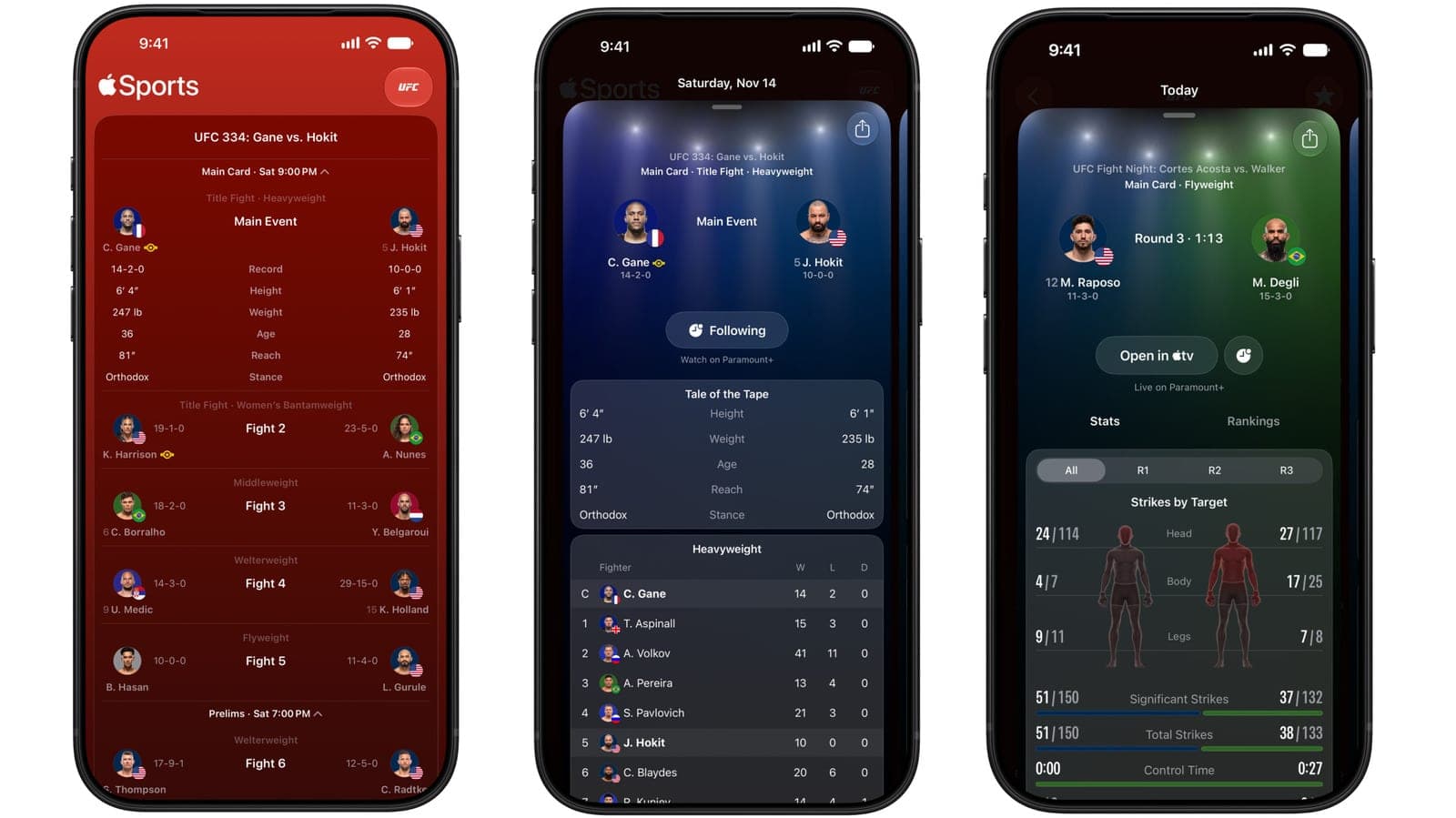
- Before the fight: a "tale of the tape," which is a side-by-side of height, weight, age, reach and win-loss record.
- Rankings: where each fighter sits in the division.
- During the fight: live stats that refresh as the action happens.
Apple's own preview for UFC 334 shows the layout. Ciryl Gane, the heavyweight champion, is listed at 14 wins and 2 losses, 6 feet 4 inches and 247 pounds. His challenger Josh Hokit is 10 and 0, 6 feet 1 inch and 235 pounds.
By the numbers: the live panel tracks total strikes, significant strikes, takedowns, knockdowns, submission attempts and control time.
Which fights are on the first card?
UFC 334 is this Saturday, November 14. It has two title fights.
- Heavyweight: Ciryl Gane defends his belt against Josh Hokit.
- Women's bantamweight: Amanda Nunes challenges champion Kayla Harrison.
The same card also lists a middleweight bout, a welterweight bout and a flyweight bout. Apple's preview shows the prelims starting at 7:00 PM and the main card at 9:00 PM.
What does the strike map show?
This is the new part. The detail card includes a body diagram that shows where strikes land: head, body or legs, for each fighter, round by round.
Think of it like the shot chart in basketball. Instead of "he threw a lot of punches," you see that one fighter keeps working the legs while the other aims high.
Apple also built a custom backdrop for UFC. The artwork is meant to feel like standing under the lights over the octagon, the eight-sided cage where the fights happen. Apple Sports already uses animated backgrounds to tell different games apart, so UFC gets its own look.
In real life You are at a friend's place with the fight on in the background. You glance at your phone and see the lock screen: round 3, 51 significant strikes to 37, and 27 seconds of control time. You now know who is ahead without asking anyone.
How do Live Activities fit in?
A Live Activity is a small panel that stays on your iPhone lock screen and updates by itself. You tap the clock icon in the app to start one.
It also shows up on your Apple Watch, and iPhone Live Activities can appear on a Mac too. That means you can follow a fight without unlocking your phone.
The catch: the app gives you numbers, not video. UFC fights are on Paramount+, and Apple Sports points you toward where to watch. If you cannot watch, you can still follow the stats.
How do you turn it on?
If you already use Apple Sports, you add UFC like any other league.
- Open the Home view and tap Edit.
- Choose UFC from the list of leagues.
- A feed of scheduled UFC events appears, with the main event highlighted.
- Drag UFC up to the top if you want it first.
If you do not have the app, it is a free download from the App Store. Apple Sports now also comes preinstalled when you set up a new iPhone from scratch.
Why is UFC on Paramount+?
The streaming home matters here, because it explains why Apple shows data and not the fights.
In August 2025, Paramount and TKO Group, the company that owns UFC, announced a seven-year deal worth about $7.7 billion, or roughly $1.1 billion a year. Paramount+ streams all 13 numbered events a year and 30 "Fight Night" events, and some big cards are also shown on CBS. It replaced the old pay-per-view model, where fans bought each event separately.
David Ellison, Paramount's chief executive, said at the time that live sports are "a cornerstone" of the company's strategy. UFC chief Dana White spoke of a possible fight on the White House lawn for the US 250th birthday.
For Apple, this is a clean split. Paramount shows the fights, and Apple Sports shows the scoreboard.
How big has Apple Sports become?
Apple Sports launched in February 2024 in the US, Canada and the UK, with a handful of leagues. It was built to be fast and simple, with scores and stats and no clutter.
Since then, the list has grown. Basketball, hockey and soccer came first, and football, tennis, golf, college sports and Formula 1 racing joined later.
In May 2026, ahead of the men's World Cup, Apple expanded the app to more than 90 additional countries and regions, bringing it to 170 in total. Oliver Schusser, an Apple vice president, said the app was designed to give fans "an easy way to stay on top of scores, stats, and the action that matters most in real time."
UFC is the latest in that line, and the first combat sport in the app.
What was the market reaction to the UFC deal?
When the Paramount deal was announced on August 11, 2025, shares of TKO Group jumped more than 10% that day. Investors read it as proof that UFC fights can pull in big streaming money without the pay-per-view model.
Mark Shapiro, TKO's president, said the deal would create "deeper engagement" for UFC's fan base. A scoreboard app on a billion-dollar-scale league fits that goal: the more ways you can follow a card, the more likely you are to tune in.
How did racing show Apple's plan?
Before UFC, Apple added Formula 1 racing to the same app in March 2025. There, the app works as a mobile companion with live leaderboards, timing data and a one-tap jump into the broadcast.
The pattern is clear. Apple picks a sport with lots of live numbers, builds a data view for it, and hands the video job to whoever owns the rights. Racing has lap times. Fighting has strikes and control time.
What do those fight numbers mean?
A few terms are worth knowing before Saturday.
- Significant strikes: punches and kicks that land with real force on the head, body or legs, as opposed to light taps.
- Takedown: pulling an opponent to the ground.
- Control time: how long one fighter holds the other in a dominant position on the mat.
- Submission attempt: a try at a choke or joint lock that forces the other fighter to give up.
In Apple's preview of a live fight, one fighter has landed 51 significant strikes out of 150 thrown, and the other 37 out of 132. Control time is 0:00 against 0:27. That is the kind of detail a crowd cannot see from the seats.
Is anything still missing?
Yes, a few things.
- No iPad or Mac app: Apple Sports is still iPhone only, and Apple has not said it plans native versions.
- No video: you need a Paramount+ subscription to watch.
- Only UFC so far: other fight leagues, such as boxing, are not mentioned.
What it means for you
- If you follow UFC: you can track every bout from prelims to the main event in one place, without a second app.
- If you already use Apple Sports: add UFC through Home, then Edit. It is free.
- If you want to watch: you still need Paramount+. The app only shows stats.
- If you like quiet phones: use a Live Activity and skip the notifications. The lock screen updates on its own.
The bottom line
Apple Sports is turning into a one-stop scoreboard, and UFC is a good fit: fast action, plenty of numbers and fights that can change in seconds. The app will not show you the punches, but it will tell you exactly how many landed. For Saturday night, that may be all you need.
Key facts
- First event
- UFC 334, Saturday, November 14
- Price
- Free app (watching still needs Paramount+)
- Platform
- iPhone, with Live Activities on Apple Watch and Mac
- Availability
- 170 countries and regions
Got questions?
Quick answers, plain wordsWhat did Apple add to Apple Sports?
Apple added UFC. The free iPhone app now follows every bout on a UFC card, with live stats, rankings and a strike map. It went live on Thursday, November 12.
When does UFC coverage start?
It starts with UFC 334 on Saturday, November 14. The card has two title fights: Ciryl Gane against Josh Hokit for the heavyweight belt, and Kayla Harrison against Amanda Nunes at women's bantamweight.
Can I watch the fights in Apple Sports?
No. The app shows data, not video. UFC events stream on Paramount+, and the app links out to where you can watch.
Is Apple Sports free?
Yes. The app is a free download from the App Store, and UFC coverage costs nothing extra. Watching the fights is a separate matter, since that needs Paramount+.
Which stats does it show?
Total strikes, significant strikes, takedowns, knockdowns, submission attempts and control time. A new picture of the body shows how many strikes landed on the head, body and legs.
What is a Live Activity?
It is a small live panel for your iPhone lock screen. It updates by itself, so you can follow a fight without opening the app. It can also appear on Apple Watch and Mac.
How do I add UFC to my home screen?
Open the Home view, tap Edit, and pick UFC from the list of leagues. You can then drag it to the top if you want fights first.
Does Apple Sports work on iPad or Mac?
Not natively. The app is iPhone only, and Apple has not announced an iPad or Mac version. Live Activities from your iPhone can show up on Apple Watch and Mac.
Where is Apple Sports available?
It reached 170 countries and regions after a May 2026 expansion that added more than 90 of them ahead of the World Cup. It first launched in February 2024 in the US, Canada and the UK.
Why do fans want live fight stats?
A fight can turn in seconds. Numbers like strikes landed and control time tell you who is really winning, even when the crowd noise says otherwise.
SourcesEngadget
Topics and tagsApple, Smartphones, apple, apple sports
Related stories
Apple posts record $114.5 billion quarter, then warns of slower growth
Apple's September quarter revenue rose 12% on iPhone, Mac and Services records, but its stock slid after hours as executives talked memory costs and shortages.
GrayKey maker reportedly found a way around the iPhone's Inactivity Reboot
A leaked training video seen by 404 Media says Magnet Forensics' new tools keep a seized iPhone in an easier-to-search state, even after the reboot Apple added in iOS 18.1.
Apple releases iOS 27.0.1, fixing an iPhone 18 Pro Face ID crash bug
Apple released iOS 27.0.1, a bug-fix update addressing an iPhone 18 Pro and Pro Max issue that caused unexpected restarts when Face ID failed, along with a touchscreen freeze bug affecting all iPhones.
More in brief
- Tesla opens Cybercab orders at $29,990, plus $299 a month to drive itNov 14
- LangChain raises $300 million at a $3 billion valuation for AI agentsNov 13
- SignDrop, a new Windows zero-day, gives attackers full System rightsNov 13
- Microsoft's AI Frontiers research group is over, says co-founder John LangfordNov 13
- BYD apologizes after wrong wheels ship on its Great Tang SUVNov 13
- Microsoft 365 outage cuts off Outlook, Teams and Copilot for hoursNov 13