
Technology·News & analysis
WhatsApp now lets you schedule messages up to 14 days ahead
WhatsApp is rolling out scheduled messages worldwide. Press and hold send, pick a time from 10 minutes to 14 days away, and the message goes out even if your phone is off.

Tide
Wave
Sci-fi
3/10
Reality
Shipping
A text that waits patiently for the right moment.How we rate
WhatsApp is rolling out scheduled messages to its 3 billion users on iPhone and Android.
Press and hold the send button, then choose a time between 10 minutes and 14 days ahead, in private chats or groups, with text, photos or videos. The message is sent even if your phone is off and stays end-to-end encrypted. The rollout is global and will take the coming weeks.
What to know
- WhatsApp began rolling out scheduled messages on November 25, 2026, for both one-on-one and group chats.
- You can pick any time from 10 minutes to 14 days ahead, and the message can be text, a photo or a video.
- The message is sent even if your phone is off or has no signal, and it stays end-to-end encrypted.
- The rollout is global and takes the coming weeks, so the option may not be on your phone yet.
WhatsApp started rolling out scheduled messages on Wednesday. You write a message now, pick a time, and the app sends it later for you.
That is the news. Now the fun part: why did an app with 3 billion users take so long to add a feature your email has had for years?
What exactly is new?
You can now schedule a message in both one-on-one chats and group chats. The feature is coming to iPhone and Android, and Meta says it is one of the most requested features from users.
Here is what you get:
- Time window: anywhere from 10 minutes to 14 days after you write the message.
- Content: text, photos and videos.
- Chats: private conversations and groups.
- Control: you can see every message you have lined up and delete it before it goes out.
The rollout is global, but it will take the coming weeks. Your phone may not have the option yet.
How do I schedule a message?
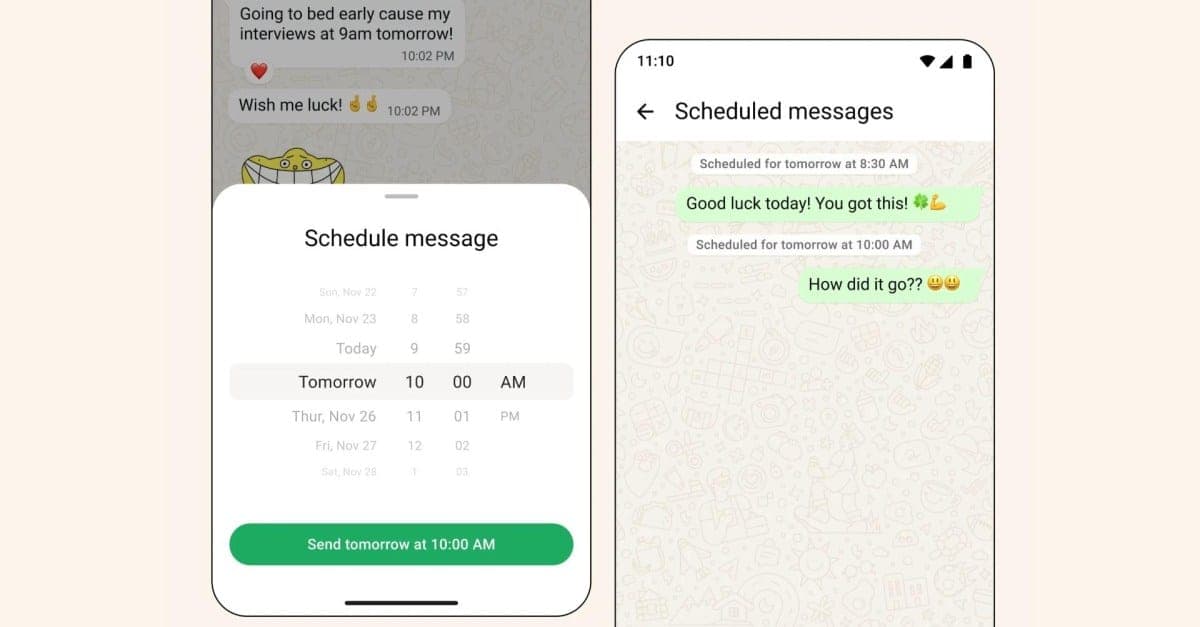
It takes one extra step. Type your message as usual, but do not tap send. Press and hold the send button instead.
A screen opens where you pick the date and time. You confirm, and the message waits. To the people who receive it, it looks like any other message. Nothing tells them it was scheduled.
In real life Your friend in Sydney has a job interview at 9 am her time, and it is the middle of the night for you. Write "good luck, you got this" tonight, schedule it for her morning, and go to sleep.
What if my phone is off?
This is the part that makes the feature useful. A scheduled message is still delivered if your phone is off or the battery is dead. It also works if you have no network at that moment.
That means the message does not depend on your device being awake. Once you confirm, WhatsApp takes over.
The details of how WhatsApp stores the message until it is due were not fully explained in the early tests.
Why it matters: a reminder that only works when your phone is on is just a reminder. A message that sends itself is a promise you can actually keep.
Is it still private?
Yes. Meta says scheduled messages are end-to-end encrypted, like all personal messages on WhatsApp. End-to-end encryption means the message is locked on your phone and unlocked only on the phones of the people you send it to.
Meta says that no one else can read it, not even WhatsApp. Scheduling does not change that.
Why did it take so long?
Most chat apps already do this. Telegram and Signal have offered scheduling for a while. Instagram, which Meta also owns, has had scheduled messages since 2024. Email apps have had it for years.
People on WhatsApp made their own workarounds. One example is the Shortcuts app on iPhone, which can be set up to send a message at a chosen time.
Now the wait is over. The new feature is simple, and that is the point: you do not need any extra app.
How did we get here?
The feature did not appear overnight. It was visible in test versions for most of 2026.
- February 2026: code in an iPhone beta pointed to a "Scheduled Messages" menu item in the group info screen.
- June 2026: the tracker WABetaInfo reported that the feature was in development for iPhone, for chats and groups.
- August 2026: WABetaInfo found signs that channel admins could also schedule their updates later.
- October 2026: the feature reached a limited number of Android beta testers, then select iPhone testers less than two weeks later.
- November 25, 2026: WhatsApp starts the global rollout.
A beta is an early version of an app that a small group tries before everyone else. That is where a feature gets its rough edges tested.
What did testers find?
Some limits showed up in the beta. They are not confirmed for the final version, so treat them as a preview.
- One media item: each scheduled message could carry only one photo or video. To send several, you schedule them one by one.
- Group rule: in a group, only people who were already members when you scheduled the message received it.
- Where the list lives: scheduled messages appeared in a section of the chat info screen, or the group info screen for groups.
It is also unclear whether you can edit the time of a message you already scheduled. You can delete it and make a new one.
The catch: a message that sends itself cannot be unsent once it is out. Check names, times and the group before you confirm.
What about channels?
WhatsApp channels are the one-way broadcast feeds that admins use to post updates to many followers. They are not part of this launch. It was still unknown whether channel support would follow when the feature was in testing.
There are hints, though. In August 2026, WABetaInfo found a test in the Android beta that let channel admins pick a date and time for an update. The admin would not need to be online or have the app open at delivery time. WhatsApp would hold the update in a queue and publish it at the right moment.
That test was described as building on the same scheduling feature. Nothing is confirmed for the public version yet.
How does it compare with Telegram?
Telegram has offered scheduling for a long time, and it goes a step further in one way. Its "Repeat" option sends a scheduled message again and again at regular intervals, which makes it a handy reminder for routine tasks.
Early reports on WhatsApp did not show a repeat option, and it was not clear whether one would come. Today, WhatsApp gives you a single delivery time per message, between 10 minutes and 14 days away.
The two apps also differ in scale. WhatsApp had more than 3 billion monthly active users, a figure Mark Zuckerberg gave in April last year. That is over a third of the world's population, so even a small feature reaches a huge crowd.
Where does it fit in WhatsApp's other changes?
Scheduling is one of several updates WhatsApp has been adding this autumn. The app has begun rolling out usernames, which let people connect without sharing a phone number right away. WhatsApp Web, the version that runs in a browser on a computer, also got audio and video calling and call transfers between devices.
Meta also recently announced that you can call anyone with WhatsApp, even if they do not have the app, and that you can invite friends to events who are not on it. You can read about the second one in our earlier story.
Put together, the app is slowly turning from a plain chat tool into a place to plan your day.
Who will use it?
The obvious use is a birthday message that lands at midnight, exactly when the day starts for the other person. Meta also suggests wishing someone luck just before a test or a job interview.
Time zones are another big reason. If a friend or a coworker lives many hours away, you can write when it suits you and deliver when it suits them.
Businesses and teams may like it too. A shop owner can plan a customer update, and a manager can send the team a note first thing on Monday without being awake for it.
What it means for you
- Update the app: the option arrives over the coming weeks, so check for updates if you do not see it.
- Press and hold send: that one gesture opens the date and time picker.
- Check the list: you can review and delete anything you scheduled before it goes out.
- Mind the limits: plan for one photo or video per scheduled message while you test it.
The bottom line
WhatsApp now does what most chat apps have done for years: it sends your message at the time you pick, up to 14 days away. It still works if your phone is off and the message stays end-to-end encrypted. Small feature, big audience, and a lot of birthdays saved.
Key facts
- Rollout started
- November 25, 2026
- Time window
- 10 minutes to 14 days ahead
- Works in
- One-on-one chats and groups
- Content
- Text, photos and videos
- Privacy
- End-to-end encrypted
Got questions?
Quick answers, plain wordsHow do I schedule a message on WhatsApp?
Type your message, then press and hold the send button. A date and time picker opens. Pick when you want it delivered and confirm.
How far ahead can I schedule a WhatsApp message?
From 10 minutes to 14 days. Anything sooner than 10 minutes you simply send now.
Does my phone need to be on when the message is sent?
No. Meta says the message still arrives at the time you chose if your phone is off or out of battery. It also goes out when you have no network coverage.
Can I schedule photos and videos?
Yes. Scheduled messages work with text, photos and videos. In the beta tests, each scheduled message could carry only one photo or video.
Will the other person know the message was scheduled?
No. It looks like any other message to the people who get it.
Can I delete a scheduled message?
Yes. You can see every message you have lined up and delete it before it goes out. In the beta, the list sat in the chat info or group info screen.
Is a scheduled message still private?
Yes. Meta says scheduled messages are end-to-end encrypted like all personal messages. That means only you and the people in the chat can read them.
Does it work in group chats?
Yes, in both groups and one-on-one chats. In the beta, only people who were already in the group when you scheduled the message received it.
When will I get scheduled messages?
The rollout is global and will take the coming weeks. Updating the app may help, but not every account gets a feature on the same day.
Do Telegram and Instagram have this too?
Yes. Telegram and Signal have had scheduling for a while, and Instagram has offered scheduled messages since 2024.
SourcesThe Verge
Topics and tagsMeta, whatsapp, meta, messaging
Related stories

WhatsApp lets you invite friends to events, even without the app
WhatsApp Events now sends invites to people who have no WhatsApp account, and a new Events Home in Settings keeps every event and RSVP in one list.
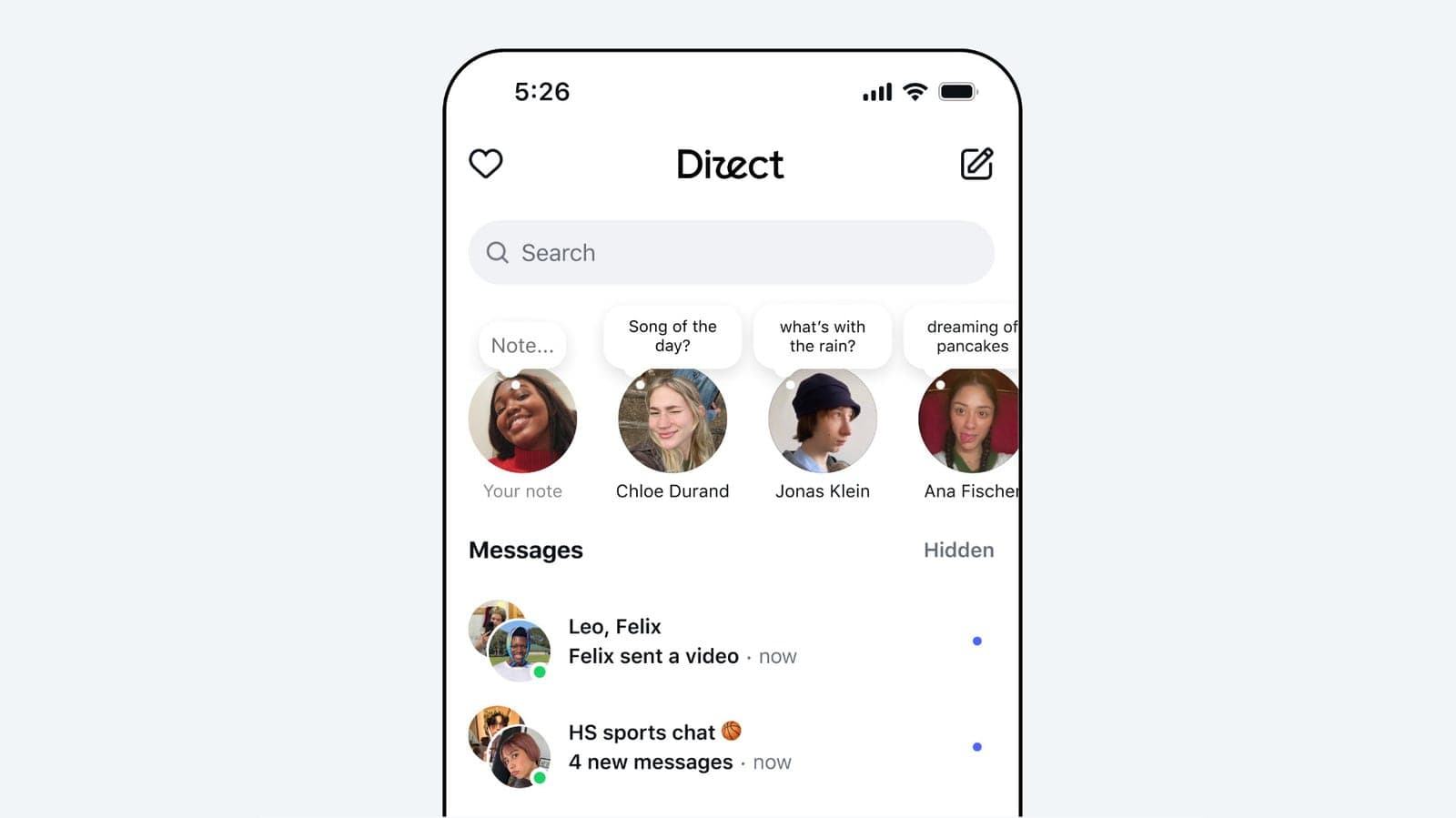
Meta is testing Direct, a messaging app from Instagram that works without an Instagram account
Meta is trying a separate messaging app called Direct in Thailand and Turkey. You can sign up with just an email or phone number.
WhatsApp now lets anyone join a call from a browser, no account needed
WhatsApp's new guest calling lets you send a link to anyone, and they can join your voice or video call from a computer browser after you let them in.
More in brief
- Amodei says handing governance to AI is "a bad idea" and calls the claim absurdNov 26
- 42 state attorneys general move to block Character.AI's auction of user chatsNov 25
- Microsoft declares Code Red after its worst Exchange Online outageNov 25
- Ladybird ships its first downloadable alpha, a browser built from scratchNov 25
- FCC lets SpaceX plan up to 1 million AI data center satellitesNov 25
- Amazon Autos is coming to the UK, with £99 car reservationsNov 25