
Technology·News & analysis
Firefox's Smart Window can now fill forms from your open tabs
Mozilla's opt-in AI browsing mode can now fill out forms using pages you pick, and watch websites for sales or job listings while Firefox is open.
Tide
Ripple
Sci-fi
4/10
Reality
Shipping
A browser that reads your tabs so you can skip the copy and paste.How we rate
Mozilla added two features to Smart Window, the opt-in AI mode in Firefox.
"Fill from sources" drafts form answers from tabs you pick, and "/watch" monitors up to five pages for changes like a sale or a new job listing. Selected page content goes to Google's Gemini 3.1 Flash Lite for form filling, and Qwen handles the watching. Both are in the desktop beta in the US and Canada, with other markets planned in the coming months.
What to know
- Mozilla added two features to Smart Window, its opt-in AI browsing experience in Firefox, on October 27, 2026.
- "Fill from sources" suggests answers for forms with at least four text fields, using only the tabs you choose. It will not submit the form for you.
- Typing "/watch" in the chat sets up a task that checks up to five pages, daily or weekly, only while Firefox is open.
- Both features are in the Smart Window beta on desktop, in English, in the US and Canada, with more markets "in the coming months."
Mozilla announced two new tricks for Smart Window, the AI mode inside Firefox. One fills in forms for you, and the other watches web pages while you do something else.
That is the news. Now the fun part: your browser is learning to read your open tabs, and the question is how much you want it to know.
First, what is Smart Window?
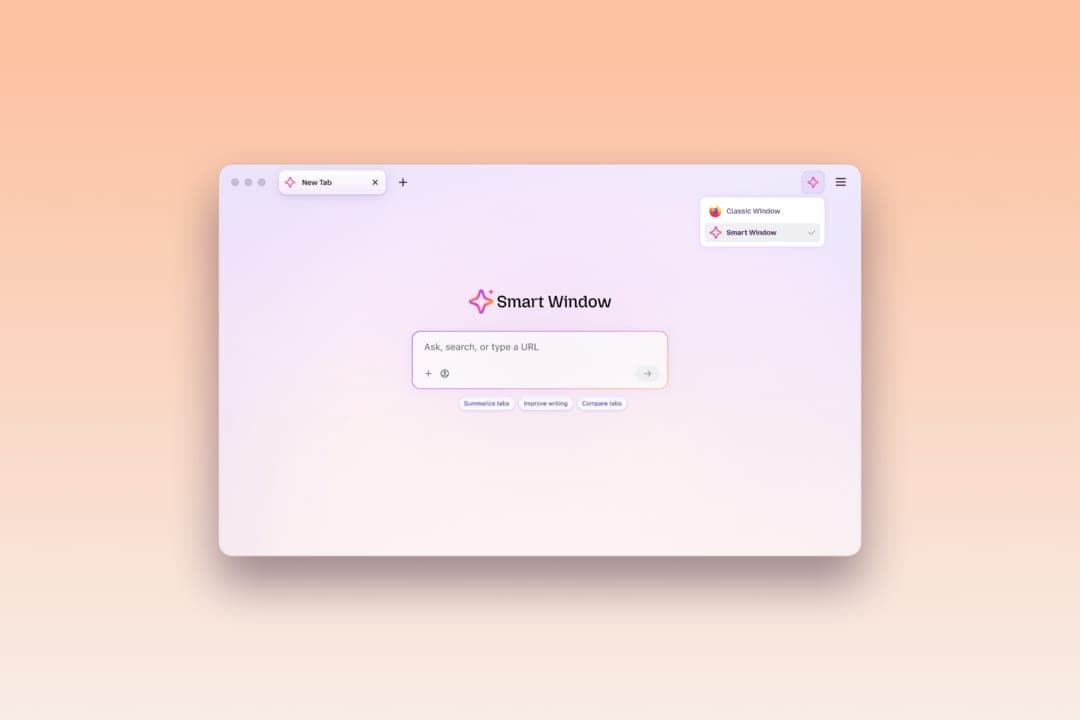
Smart Window is Firefox's opt-in AI browsing experience. Opt-in means it stays off until you choose it. You can switch between a Classic Window and a Smart Window from a menu at the top right.
In Smart Window, you can chat with an AI assistant while you browse. 9to5Mac reports that Mozilla first announced the idea nearly a year ago under the name AI Window. It was later renamed Smart Window.
Since then it has picked up more skills. A few months ago, 9to5Mac says, Mozilla added AI-powered web search, automatic tab grouping, duplicate tab detection and the ability to search your browsing history in plain language.
Why it matters: these two features are more hands-on than a chat box. They do small chores for you, which is the direction most browsers are heading.
How does the AI form filling work?
Think about a job application. It asks for your work history, and that history is probably sitting in another tab, on your online portfolio or professional profile. Until now, you copied and pasted it by hand.
Now Smart Window can use pages you choose to suggest what to type. Mozilla says it could draw on a profile page to fill in your work history. It could also draft an answer to a question like "Tell me about a time when..."
Here is how you use it:
- Start: Click into a form field. If the form has at least four text fields Smart Window can help fill, you see "Fill from sources" in the dropdown.
- Pick tabs: Smart Window suggests a source page. You can click the pencil icon to open "Edit sources" and change or add tabs.
- Review: Check the suggestions and edit them. Smart Window will not submit the form for you.
In real life You are applying for a job and your portfolio is open in another tab. You click into the form, choose "Fill from sources," and get a draft of your work history to tidy up instead of typing it all again.
The Verge notes that Mozilla is working on support for dropdown menus and PDF forms. For now, the feature handles text fields on web forms only.
What about regular autofill?
Regular autofill is the button that types your name and address. It is not going away. Mozilla says Firefox's regular autofill still handles saved details like these, without using AI models.
Mozilla also says saved autofill values stay on your device. The new feature is for the open-ended parts of a form, the ones that no saved address can answer.
9to5Mac puts it this way: this goes beyond traditional autofill, which handles basic details like names, addresses and contact information. Smart Window writes answers based on what is on your other open pages.
Where does your data go?
This is the part worth reading twice. To fill a form, Smart Window has to read the tabs you pick. An AI model does that reading, which means the content of those pages leaves your computer.
Mozilla says the information from your selected source pages is shared with Gemini 3.1 Flash Lite. That is a Google AI model, and Mozilla says it is used for detecting the fields and extracting relevant information from your selected tabs.
Three details soften this a little:
- You choose the tabs: Only pages you select as sources are used. You can select or deselect tabs before anything is generated.
- Chat stays separate: Mozilla says your model choice for Smart Window chat stays the same. The form feature uses its own model.
- Nothing is kept: Mozilla says the feature does not save any generated form fill data.
The catch: if a tab holds something private, such as a medical page or a bank page, leave it out of your sources. The tool reads what you point it at.
What does "/watch" do?
The second feature is for people who refresh a page and hope. Mozilla jokes that a watched pot never boils, and that refreshing a page will not make an update appear sooner.
With "/watch," Smart Window checks pages for you. You describe what you want, such as an item going on sale or a new job listing with a job title or company name you follow. Smart Window then looks for it.
Setting it up takes four steps:
- Type: Enter "/watch" in the Smart Window chat.
- Describe: Say what change you are looking for.
- Add pages: Each task can follow up to five pages, so you can watch several stores or job boards at once.
- Choose a schedule: Firefox checks daily or weekly.
One limit matters. Mozilla says the checks run only while the browser is open. If you close Firefox for the weekend, nothing is being watched.
In real life You want a pair of boots when the price drops. You add three store pages to one task and pick daily checks. When one page shows a sale, Firefox tells you.
How will it tell you, and how long does it run?
When there is a match, you see an update through the Tasks button in the toolbar. With desktop notifications enabled, Firefox can also notify you directly. Clicking the notification opens the watched pages.
You can have up to 15 active tasks at a time. You can edit, pause or delete any of them.
Tasks do not run forever. Smart Window automatically pauses a task after 60 days without a matching change. If 90 days pass without one, it stops checking altogether.
To spot matches, the page monitoring uses the Qwen AI model, according to Mozilla. 9to5Mac points out that this is a different model from the one used for form filling.
How is this like Safari?
9to5Mac draws a comparison. It says website monitoring works similarly to Safari's new "Notify Me" feature, introduced with iOS 27 and macOS 27.
That is a fair way to see the trend. Browsers used to show pages. Now they are starting to watch them and act on your behalf, with an AI model in the middle.
Firefox's version has clear guardrails: a cap of five pages per task, a cap of 15 tasks, and automatic pausing after two months of silence.
Who can use it, and when?
Not everyone yet. The two features are rolling out to the Smart Window beta on Firefox for desktop. A beta is an early version that Mozilla is still testing with users.
They are available in English in the United States and Canada. Mozilla says they will roll out to additional markets in the coming months.
Mozilla invites people to try Smart Window and share their experience on Mozilla Connect, its feedback site, and to say what they would like it to help with next.
What it means for you
- Job hunters: Keep your portfolio or profile open and let Smart Window draft the long answers. Always read them before you submit.
- Deal watchers: Use "/watch" for sales and new listings, and keep Firefox open so the checks can run.
- Privacy minded: Pick your source tabs carefully, because their content is shared with an AI model while the feature works.
- Outside the US and Canada: You will have to wait for the wider rollout.
The bottom line
Firefox now lets its AI mode do two small jobs: draft form answers from tabs you pick, and watch pages for changes you care about. You stay in charge, because nothing is submitted for you and you choose the sources.
It is a beta, it is limited to two countries, and your selected pages go to an AI model when you use it. If you are fine with that, it can save you a lot of copy and paste.
Key facts
- Announced
- October 27, 2026
- Form fill trigger
- A form with at least 4 text fields
- Page watching limits
- Up to 5 pages per task, 15 active tasks
- Availability
- Smart Window beta, desktop, US and Canada, English
Got questions?
Quick answers, plain wordsWhat is Firefox's Smart Window?
It is Firefox's opt-in AI browsing experience. It lets you chat with an AI assistant while you browse, and it has gradually gained tools such as AI search, tab grouping and history search in plain language.
How does the new AI form filling work?
Click into a form with at least four text fields that Smart Window can help fill, then choose "Fill from sources." Pick the tabs it may read, review the suggestions, edit them and submit the form yourself.
Will Smart Window submit my forms for me?
No. Mozilla says you review the suggestions and can edit them before submitting, and that Smart Window will not submit the form for you.
Which AI model reads my tabs for form filling?
Mozilla says information from the source pages you select is shared with Google's Gemini 3.1 Flash Lite, which detects the fields and extracts the details. Your model choice for Smart Window chat stays the same.
Does regular autofill change?
No. Firefox's regular autofill still handles saved details such as your name and address without using AI models, and Mozilla says saved autofill values stay on your device.
How do I watch a page for changes?
Type "/watch" in the Smart Window chat, describe what you are looking for, add the pages, and choose daily or weekly checks. A task can follow up to five pages.
How will Firefox tell me about a change?
You see an update through the Tasks button in the toolbar. If desktop notifications are on, Firefox can also send one, and clicking it opens the watched pages.
Does page watching work when Firefox is closed?
No. Mozilla says the checks run only while the browser is open.
How long does a watch task keep running?
Smart Window pauses a task after 60 days without a matching change. If 90 days pass without one, it stops checking altogether. You can have up to 15 active tasks and can edit, pause or delete them.
Who can use these features, and where?
They are in the Smart Window beta on Firefox for desktop, in English, in the US and Canada. Mozilla says other markets will follow in the coming months.
SourcesMozilla
Topics and tagsfirefox, mozilla, smart window, browsers
Related stories

GMO Internet says hackers posted data stolen from its Onamae cloud desktops
The Japanese company refused an 8 billion yen ransom demand after a breach that may have touched up to 26,739 servers used for automated currency trading. It now says the attacker has posted data online.

Discord will let Google show messages from its biggest public servers
From mid-December, some messages in Discord's large public servers may appear in web search results. Admins and members can opt out, and the setting is off by default in several regions.

Microsoft offers 60,000 employees a voluntary exit package
Microsoft is giving about a quarter of its workforce in four countries the choice to leave with severance and support. Nobody has to go, and the window closes on December 31.
More in brief
- Apple's new iMac gets the M6 chip, Wi-Fi 7 and a $1,499 starting priceOct 27
- Turo will let renters filter for Teslas with Full Self-DrivingOct 26
- Meta launches a $35 billion stock sale and plans $60 billion more for AIOct 26
- iFixit tears down the iPhone Duo: best foldable repair score, but a screen problemOct 26
- Teradyne Robotics and Sereact team up to put AI-driven robot arms in warehousesOct 25
- Eka Robotics raises $150M for robot hands that feel what they gripOct 24