
Technology·News & analysis
Microsoft breaks Excel's 40-year one-value-per-cell rule
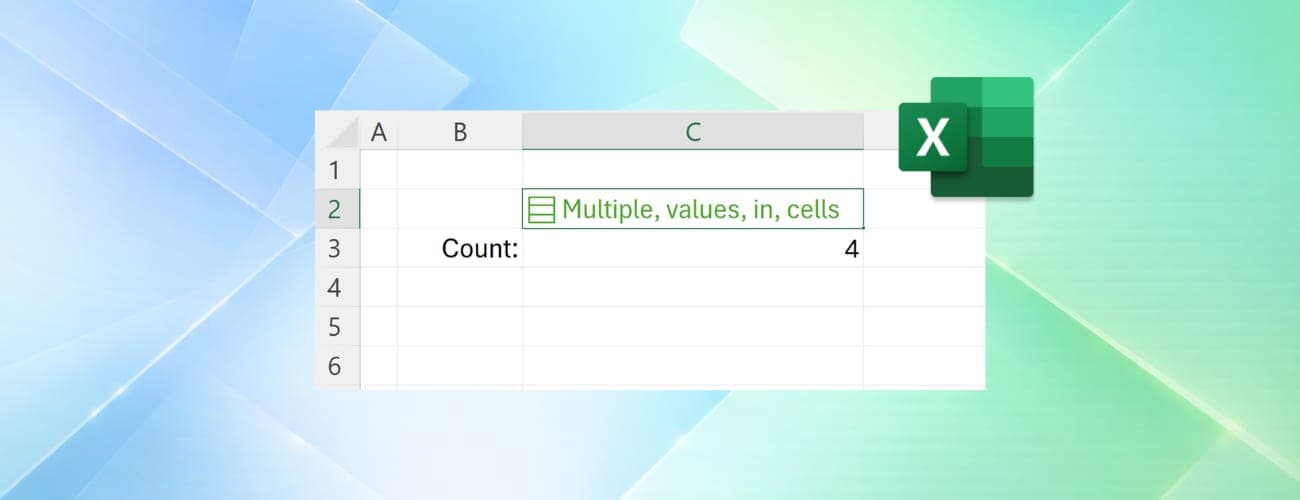
Excel is rolling out Lists, Arrays in Cells and Nested Arrays, letting a single cell hold multiple values that still work individually for filtering and calculations.
The 30-second version
The details
- Microsoft is rolling out Lists, Arrays in Cells and Nested Arrays for Excel, ending the spreadsheet's 40-year rule that a cell can only hold one value.
- A cell holding a list like 'Carlos, Henrietta, Jacob' now lets each name be filtered, calculated and analyzed individually, instead of being treated as one text string.
- The feature is available now in Excel for Windows and Mac Beta Channels, opt-in, and not yet ready for important workbooks.
- External tools that read Excel files, including openpyxl, pandas and calamine, may need updates once Microsoft publishes how the new data types are represented in .xlsx files.
Why it matters
Multi-value cells have been one of Excel's most requested features for years, according to Microsoft's own community forums. The change could also break tools and workflows built around the old one-value-per-cell assumption, including PivotTables and third-party libraries that parse spreadsheet data.
The full story
Microsoft is retiring one of Excel's oldest and most rigid rules. The Register reports that the company has ended 40 years of single-occupancy for Excel cells, rolling out a set of features that let one cell hold multiple values at once.
What's changing
"One of the oldest rules of spreadsheets: one cell, one value," said Jake Armstrong, Excel's senior product manager, in a LinkedIn post announcing the change. "No longer!" The update introduces three related capabilities: Lists, Arrays in Cells, and Nested Arrays.
Armstrong illustrated the practical case with project ownership: a project can have multiple owners, and previously, representing that meant reaching for separate columns, helper tables, or cramming names together as plain text like "Carlos, Henrietta, Jacob" in a single cell. With lists, those values stay together in one cell while remaining individually usable, so project owners stay connected to their project but are still available for filtering, calculations and analysis one at a time.
How it actually works
In practical terms, a cell holding "Carlos, Henrietta, Jacob" used to be treated by Excel as a single, indivisible piece of text. If someone wanted to filter a project tracker to show only tasks belonging to Carlos, there was no way to do that without splitting the names into separate cells first. With the new lists feature, Carlos can now appear as his own individual choice in a filter, rather than being locked together with Henrietta and Jacob as one combined entry. For numeric values, the same principle applies to calculations, so numbers packed into a list can be used in formulas without first spreading them across extra rows or columns.
Why it took 40 years
The underlying technical reason traces back to how Excel formulas have always worked. Joe McDaid, a former Excel program manager, has explained that ordinary Excel formulas relied on a calculation behavior called implicit intersection, which would silently select a single value out of an array of values. That behavior existed specifically to guarantee that a formula would always return just one result, because a cell was only ever built to hold one value in the first place.
Demand for a way around this limitation has been building for years. Windows Latest points to a 2026 Microsoft community thread as one of many examples: a 2021 post asking how to filter individual values stored in a single cell drew responses from at least 20 other users reporting the same frustration. "Excel is not really happy working with 'multiple values' in a single cell," one community reply noted at the time. Similar complaints continued at least into November 2022, when another user wrote, "When I try to search in the list, all the values in a cell merge together to form one longer string." Microsoft hasn't offered a specific explanation for why the change took as long as it did, beyond the architectural constraint McDaid described.
Who can use it, and the risks of using it too soon
The feature is currently limited to the Beta Channels of Excel for Windows and Mac, and it's opt-in rather than on by default. Microsoft's own guidance, according to reporting on Armstrong's announcement, comes with a clear caveat: this is a preview feature, and it shouldn't be relied on in important workbooks until it reaches general availability.
That caution isn't just boilerplate. Commenters responding to Armstrong's LinkedIn post raised concerns that the change has the potential to break existing spreadsheets and make business logic harder to audit, since formulas and data that used to behave predictably as single values may now carry hidden structure that isn't obvious at a glance.
How to actually create a list, and the new functions that go with it
The feature requires Excel for Windows Version 2610 (Build 20520.20000) or later on the Microsoft 365 Insider Beta Channel, with Mac support included as well. To create a list inside a cell, users can go to Insert > List, or use the keyboard shortcut Ctrl+J, then type or paste items separated by commas or semicolons, depending on regional settings.
Nested arrays work similarly, letting an array contain other arrays instead of just flat values, for example a formula like ={{1,2,3};{4,5,6}}. Previously, a formula that tried to produce an array of arrays like this would either return a truncated result or throw a #CALC! error, since Excel had no way to represent that kind of nested structure inside a single cell.
The values inside a list aren't limited to text. Excel's lists can hold text, numbers, dates, or booleans arranged in a column-like format inside the cell, which is what lets a single cell substitute for what used to require several rows or columns of related data, while keeping each entry individually addressable by formulas.
Alongside the new cell structure, Microsoft is shipping four new functions built specifically to work with values stored inside lists and arrays: HAS, HASALL, HASANY, and FLATTEN. HAS returns TRUE if a given value appears anywhere in an array. HASANY returns TRUE if any one of several specified values appears in an array, while HASALL requires all of the specified values to be present before returning TRUE. FLATTEN, as the name suggests, converts a multi-value structure back into a flat, traditional layout.
The compatibility problem
The bigger practical risk sits outside Excel itself, in the ecosystem of tools built to read and write spreadsheet files. Microsoft hasn't yet published how lists, arrays in cells and nested arrays will be represented in the underlying .xlsx XML format, and external software libraries that expect a cell's value to be a plain string, number, boolean or date may need to be updated once that spec is available. The Register specifically names openpyxl, pandas and calamine, three widely used tools for programmatically reading Excel data, as libraries that could be affected.
The same compatibility gap extends to applications that import Excel files without any current concept of multi-value cells, including CSV export, Google Sheets, LibreOffice, and older builds of Excel itself. Within Excel, some existing features aren't ready either: PivotTables, Power Query, charts, data validation, conditional formatting, and Find & Replace all currently offer limited or no support for working with individual values stored inside a list or array. Users may need to flatten lists and arrays back into a more traditional single-value structure with the new FLATTEN function to use them with tools like PivotTables, at least until those features are updated to understand the new cell structure natively.
What comes next
For now, the practical advice is patience. The feature works today for anyone willing to opt into Excel's Beta Channel and experiment, but the safest path for real, ongoing work is to wait for general availability, and for Microsoft to publish the technical details third-party tools will need to catch up. Given how long-requested this capability has been, based on years of user complaints on Microsoft's own forums, the arrival of a working version, even in preview, marks a genuine shift in how spreadsheets can represent data.
The rollout requires Windows Version 2610, Build 20520.20000 or later on the Beta Channel, and Microsoft has confirmed Mac support is included in the same wave rather than arriving separately later, which suggests the company is treating this as a cross-platform priority rather than a Windows-first experiment. More: Microsoft news.
Additional reporting: Windows Latest.
Key facts
- New features
- Lists, Arrays in Cells, Nested Arrays
- Availability
- Excel for Windows and Mac, Beta Channels only, opt-in
- Old limitation
- "Implicit intersection" forced formulas to return a single value from an array
- Compatibility risk
- openpyxl, pandas, calamine, CSV export, Google Sheets and older Excel builds may not read the new data type
- Status
- Preview feature; Microsoft says not to use it in important workbooks yet
Quick questions
What are Lists, Arrays in Cells and Nested Arrays in Excel?
They're new Excel features that let a single cell store more than one value, keeping each item individually usable for filtering, calculations and analysis, instead of forcing everything into one text string or separate cells.
Can I use this feature right now?
Yes, if you're on the Excel for Windows or Mac Beta Channel. It's opt-in and Microsoft describes it as a preview feature, warning against using it in important workbooks until it reaches general availability.
How did Excel handle multiple values in one cell before this?
It didn't, really. Typing something like "Carlos, Henrietta, Jacob" into a cell created a single text string. Filtering for just "Carlos" wasn't possible without splitting the values into separate cells or helper columns.
Why couldn't Excel do this for 40 years?
Former Excel program manager Joe McDaid has explained that ordinary Excel formulas used a calculation behavior called implicit intersection, which silently picked a single value out of an array so that a cell would always return just one result, since that's all a cell could hold.
What happens to tools that read Excel files, like Python's pandas or openpyxl?
They may need updates. Microsoft hasn't yet published how lists, arrays in cells and nested arrays get represented inside the underlying .xlsx XML format, which libraries like openpyxl, pandas and calamine rely on to parse spreadsheet data.
Will multi-value cells work with PivotTables?
Not automatically yet. Users may need to flatten lists and arrays into a more traditional format to use them with existing features like PivotTables, until those features are updated to understand the new cell structure.
What about Google Sheets, CSV exports, or older Excel versions?
Those aren't currently equipped to handle multi-value cells either. Applications and formats that don't yet have a concept of the new data type, including CSV export, Google Sheets, LibreOffice and older Excel builds, are affected the same way external libraries are.
Have Excel users been asking for this feature?
Yes, for years. Microsoft's own community forums show repeated requests going back at least to 2021, when users asked how to filter individual values stored in the same cell, with dozens of people reporting the same limitation over time.
Does this replace using separate columns or helper tables?
Not necessarily, but it removes the need for them in many cases. Previously, keeping multiple related values, like several project owners, individually usable required separate columns or helper tables; lists let those values stay together in one cell while still being filterable and calculable on their own.
How do I create a list inside a cell?
Go to Insert > List, or press Ctrl+J, then type or paste items separated by commas or semicolons, depending on your regional settings.
What new functions come with this feature?
Four: HAS returns TRUE if a value appears anywhere in an array, HASANY returns TRUE if any of several specified values appear, HASALL requires all specified values to be present, and FLATTEN converts a multi-value structure back into a traditional flat layout.
Source: The Register
Related stories

Microsoft quietly drops the Copilot+ PC brand
New Surface laptops meet every Copilot+ requirement but no longer carry the name, a sign Microsoft is moving on from its troubled 2024 AI PC label.

Apple's new London music venue opens with Elton John, Baby Keem
Apple Music Hall, a 600-seat venue in London's Battersea Power Station, kicks off its first shows with Elton John on September 28, with every performance capturable in Spatial Audio.

Leaked images reveal a new HomePod mini, iPad mini and Apple TV 4K
Code and leaked images point to an October Apple hardware refresh: a new iPad mini with an A20 Pro chip, HomePod mini colors and a redesigned Apple TV 4K.