
Technology·News & analysis
Affinity for iPad launches, and it is free for individuals
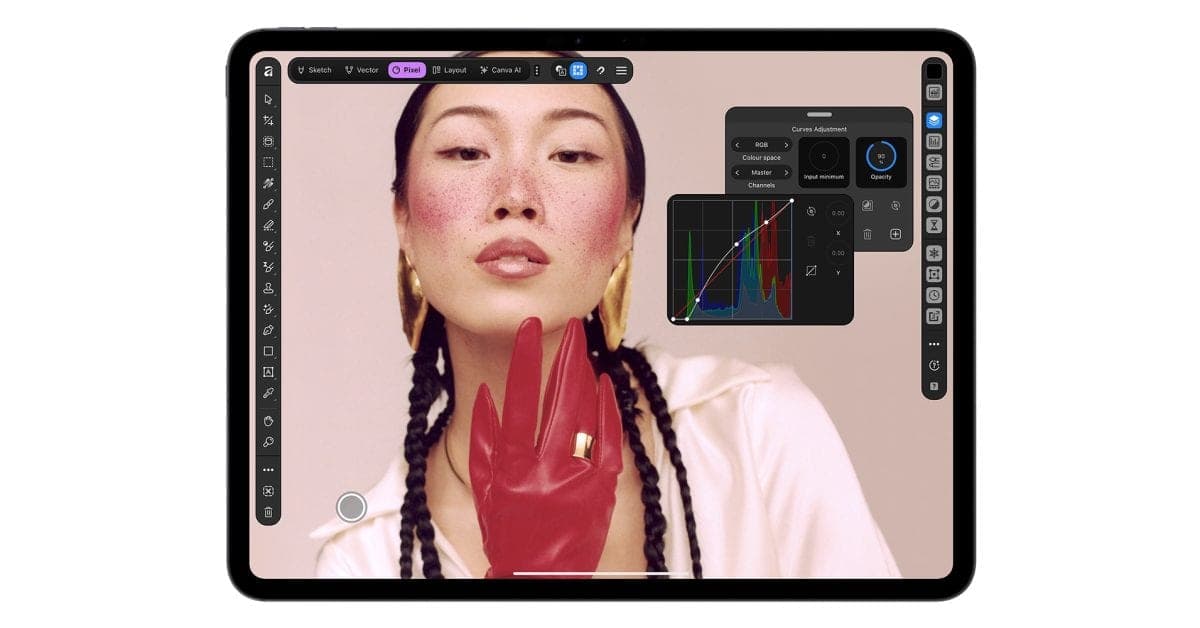
Canva has brought its all-in-one Affinity design app to iPad, with sketching, vector art, photo editing and page layout in one place.
Tide
Wave
Sci-fi
3/10
Reality
In your hands
A whole design studio that fits in your backpack.How we rate
Canva launched Affinity for iPad on November 2, bringing sketch, vector, photo and page layout tools into one app that is free for individuals.
The app supports every Apple Pencil Pro feature, including pressure, tilt, barrel roll, squeeze and hover. Canva says the desktop version has passed seven million sign-ups since it launched a year ago. Optional AI tools need Canva Pro, which starts at $18 a month.
What to know
- Canva launched Affinity for iPad on November 2, 2026, a free download from the App Store.
- The core sketch, vector, photo and layout tools are free for individuals, but they need a free Canva account.
- The AI tools are optional and need a Canva Pro subscription, which starts at $18 a month, The Verge reports.
- The app supports Apple Pencil Pro features such as pressure, tilt, barrel roll, squeeze and hover.
Canva has launched Affinity for iPad, and the main tools cost nothing for individuals.
That is the news. Now the interesting question: why did so many creative people wait so long for a version that fits on a tablet?
What is Affinity for iPad?
Affinity is a set of creative tools for drawing, editing photos and laying out pages. Canva, the company behind the popular Canva design site, now owns it. The Verge reports that Canva relaunched the suite last year as one all-in-one desktop app.
Now the same idea has reached the iPad. The app is built for touch screens and for the Apple Pencil, Apple's stylus.
9to5Mac says Canva calls it "the same pro-level power" as the desktop version. It says the app lets you take a project from a first sketch to a print-ready file without leaving the iPad.
Why is one app a big deal?
Before the all-in-one approach, Affinity came as three apps: Photo, Publisher and Designer. 9to5Mac says the integrated app replaces all three.
Each app handled a different job. Photo edited pictures, Designer drew vector art, and Publisher built page layouts.
The Verge says sketch, vector design, photo editing and layout projects can all be saved to the same .af file. That means fewer trips where you export a file, convert it, and rebuild it in another app.
In real life Say you are making a poster for a school bake sale. You sketch the cake, turn it into clean shapes, add a photo of the real cake, and set the text. It all happens in one file.
What can you do inside it?
Canva describes four main areas, according to 9to5Mac:
- Sketch: rough out ideas with pressure and tilt in every mark. A full brush library comes with controls to shape each brush. Sketches stay live in the file, so you build on them rather than trace them again.
- Vector: build logos and icons with real curves and precise points. Vector art is made of lines and shapes instead of pixels, so it stays sharp at any size. A feature called Sketch to Shapes turns hand-drawn forms into clean vector shapes.
- Photo: adjust RAW files, which are unprocessed camera photos. You can retouch in real time and build composites. Every mask, grade and retouch stays live and undoable.
- Layout: create multi-page documents such as zines, lookbooks and photo books. Master pages and grids keep things consistent, and projects go to a print-ready file with proper colour handling.
By the numbers: 9to5Mac says "thousands of layers deep" stays undoable. That is a lot of chances to change your mind.
What is Sketch Studio?
The Verge says the app has a new Sketch Studio. It is meant for freehand drawing and for turning sketches into vector shapes.
It also has tools for masking. A mask is a way to pick part of an image so that you can edit only that part.
9to5Mac says the Mask Tool finds the edge of a subject as the Pencil runs along it. Hair, fur and leaves take "a stroke rather than an afternoon," in Canva's words.
How does it use Apple Pencil?
Both outlets say the app supports the advanced Apple Pencil Pro features. The Verge lists pressure sensitivity, tilt, barrel roll, squeeze and hover.
Here is what those mean in plain words:
- Pressure: press harder and the line gets thicker.
- Tilt: lean the pencil and the line gets softer, like shading with a real pencil.
- Barrel roll: twist the pencil in your fingers to turn a brush.
- Squeeze and hover: squeeze to open shortcuts, or hover over the screen to see where the tool will land.
Affinity's head of product design, Neil Ladkin, said in the announcement that the app was built by people who create on iPad themselves. He added: "If you're the sort of person who rotates the canvas 40 times to get one line right, Affinity for iPad was made by people who've done exactly that."
Is it really free?
The catch: the answer is yes for the basics, with one condition. The Verge says the core sketch, vector, photo editing and layout tools are completely free for individuals, but they require a free Canva account.
The AI tools are a separate matter. They are optional and need a Canva Pro subscription, which starts at $18 a month, according to The Verge.
9to5Mac says the AI features include generative expand, which extends the background of an image. They also include upscaling, which raises the resolution of a picture, and adding effects like motion blur. A Decompose Layer feature splits a flat image into editable layers. The Verge adds automatic noise reduction to the list.
Why did people worry about Canva owning Affinity?
The Verge reports that Canva bought Serif, the company that makes Affinity, in 2024. Some users were worried.
They feared Affinity would move from a one-time purchase to a monthly subscription. They also feared it would adopt Canva's generative AI tools, which could remove a big part of its appeal next to rival software from Adobe.
Canva and Serif pledged not to force users into subscribing. The Verge says that is still the case.
Canva says the desktop version has recorded more than seven million sign-ups since launching a year ago, 9to5Mac reports. Canva's Duncan Clark, CEO of Pro Design, said the biggest user request since the desktop launch was an iPad version: "Today we're delivering it: a fully-fledged, professional app built for touch."
Can it open files from other apps?
The Verge says the app also works with all major design file types. So you are not locked into the .af format.
That matters for anyone who already has years of work in other tools. You can bring a file in, change it with the Pencil, and send it back out.
Why it matters: a design app is only as useful as the files it can read. A tablet app that could not open your old work would be a toy, and Canva says it wants this one to be "a fully-fledged, professional app."
What is Canva's AI Studio?
The Verge says Canva added its AI Studio to the app. It groups the AI tools in one place: Generative Expand for stretching a background, automatic motion blur, noise reduction and resolution scaling.
Noise is the grainy speckle that shows up in dark photos. Resolution scaling makes a small picture larger without it going blurry.
These tools are not needed for the main app. If you only want to draw, edit and lay out pages, you can ignore the AI Studio and never pay.
What it means for you
- Free to try: if you own an iPad, you can download it and start drawing at no cost. Just sign in with a free Canva account.
- One file: sketches, photos and layouts live together, so you spend less time exporting.
- AI is optional: you only pay if you want the AI tools through Canva Pro.
- Pencil owners gain most: the app supports every Apple Pencil Pro feature Canva lists.
The bottom line
Affinity for iPad puts a full creative studio on a tablet. The core tools are free for individuals, and the paid part is limited to optional AI features.
For people who worried that Affinity would turn into a subscription app, this launch is a small but real sign that the promise has held so far.
Key facts
- Launched
- November 2, 2026
- Price
- Free for individuals (Canva account needed)
- AI tools
- Optional, Canva Pro from $18 a month
- Desktop sign-ups
- More than 7 million in a year
Got questions?
Quick answers, plain wordsWhat is Affinity for iPad?
It is Canva's all-in-one creative app for iPad. It combines sketching, vector design, photo editing and page layout in one app, built for touch and Apple Pencil.
Is Affinity for iPad free?
Yes for individuals. The core sketch, vector, photo editing and layout tools are free, and you need a free Canva account, according to The Verge.
How much do the AI tools cost?
The AI tools are optional and need a Canva Pro subscription, which starts at $18 a month, The Verge reports.
Where do I download it?
9to5Mac says it is a free download from the App Store.
Does it work with Apple Pencil Pro?
Yes. Canva says it supports pressure, tilt, barrel roll, squeeze and hover.
What is Sketch Studio?
A mode for freehand drawing. It also helps turn rough sketches into cleaner vector shapes.
Do I need three separate apps?
No. The integrated app replaces the separate Affinity Photo, Affinity Publisher and Affinity Designer apps, according to 9to5Mac.
Will I have to pay a subscription for the basic tools?
Not for the core tools. Canva and Serif pledged not to force users into subscribing, and The Verge says that is still the case.
Can I open files from other design apps?
The Verge says the app is compatible with all major design file types, and it saves projects to its own .af file.
SourcesThe Verge
Topics and tagsApple, affinity, canva, ipad
Go deeper
Related stories
No Man's Sky is coming to iPhone and iPad on October 28
Hello Games is bringing the full game, with all its updates, to phones as old as the iPhone 11. It costs $19.99 and you can try it free.
Leaked images reveal a new HomePod mini, iPad mini and Apple TV 4K
Code and leaked images point to an October Apple hardware refresh: a new iPad mini with an A20 Pro chip, HomePod mini colors and a redesigned Apple TV 4K.
The 16GB Raspberry Pi 5 now costs $385, triple its launch price
Raspberry Pi added $80 to its top Pi 5 model, blaming a memory shortage it calls unavoidable but temporary. Makers are already looking at cheaper boards and mini PCs.
More in brief
- Anthropic confirms Claude Code now steers away from cloning existing gamesNov 2
- Canada stopped changing clocks, and Microsoft's calendars are catching upNov 2
- Supermarket freezer hacks spread to Belgium, Sweden and beyondNov 2
- Linux 7.4 has the biggest merge window ever, and AI is behind much of itNov 2
- UK landlines switch off on January 31, and Openreach says no extensionNov 1
- Bolt Graphics powers on its first Zeus GPU test chipOct 31