
AI·News & analysis
ChatGPT can now read your Chrome tabs and do tasks in them
OpenAI's upgraded Chrome extension lets ChatGPT compare your open tabs, fill out forms and send messages, with the full app now in the sidebar.
Tide
Wave
Sci-fi
5/10
Reality
In your hands
An assistant that can read the 14 tabs you swore you'd get back to.How we rate
OpenAI upgraded its ChatGPT extension for Chrome so the assistant can read across your open tabs and, in Work mode, act in them by sending messages, filling out forms and downloading files.
ChatGPT asks before using each new site and before touching your history. The extension has 7,000,000 users and works on all ChatGPT plans. It replaces the Atlas browser OpenAI shut down in August.
What to know
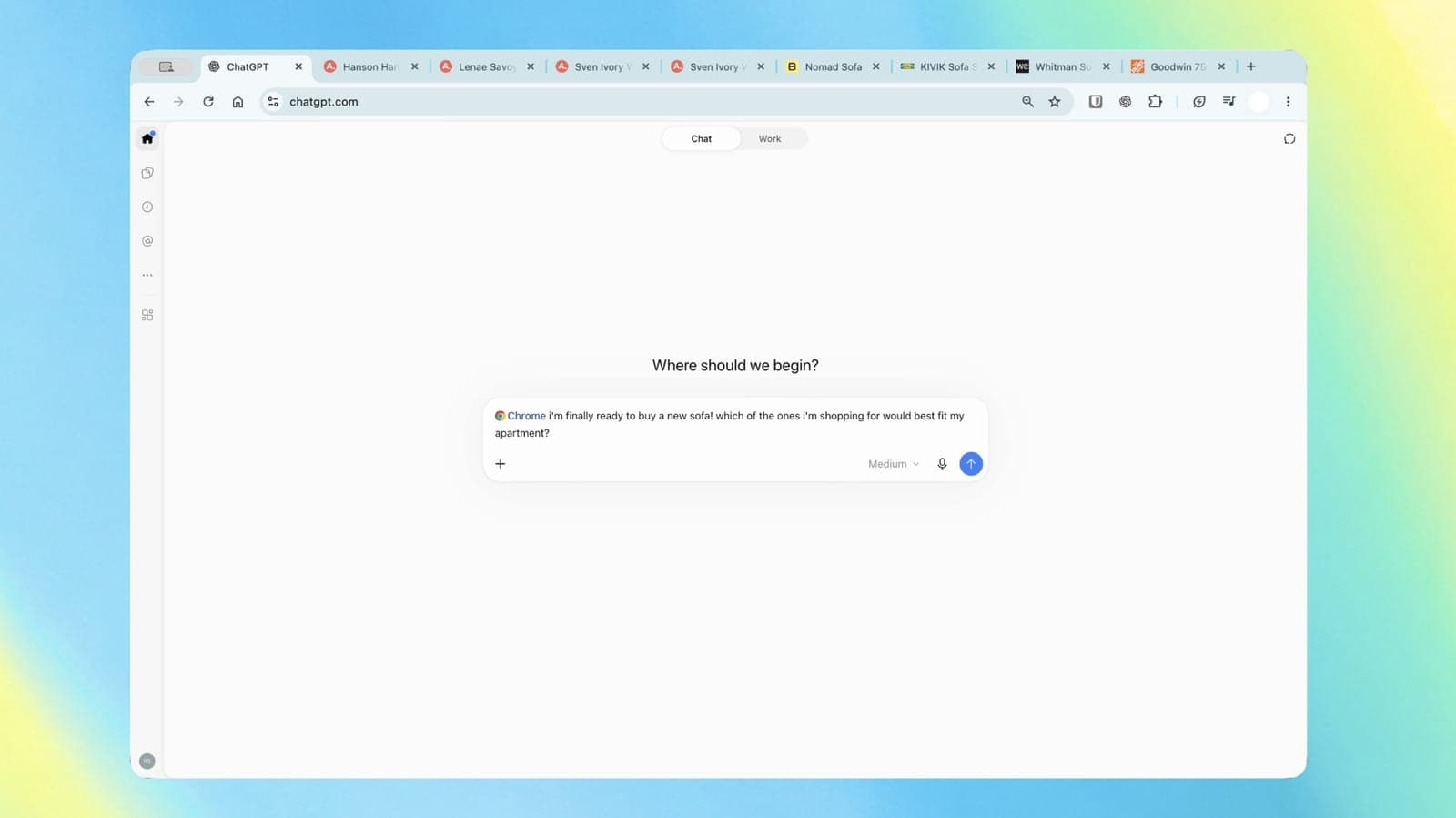
- OpenAI's ChatGPT extension for Chrome can now look across your open tabs in Chat mode to answer questions, like comparing three sofas you have open.
- In Work mode, ChatGPT can control your tabs to send messages, fill out forms, download files and group tabs.
- The Chrome sidebar now carries the full ChatGPT app with your whole conversation history.
- ChatGPT asks before using each new site, and always asks before touching your browsing history or moving files.
OpenAI announced that ChatGPT can now use the tabs you already have open in Chrome, read them, and even get things done in them. The fun question is how much you want an AI clicking around in your browser, and how OpenAI keeps it on a leash.
What exactly changed?
The update lives in the ChatGPT extension for Chrome. OpenAI's pitch, in its own words, is "bringing the power of computer use to anyone who uses Chrome." Computer use means the AI can look at a screen and operate it, clicking and typing like a person would.
The upgrade splits into three parts:
- Chat reads your tabs: ChatGPT can look across your open tabs to gather information and make its answers more useful.
- Work acts in your tabs: Work is OpenAI's agent for longer, multi-step jobs. It can now control Chrome tabs to send messages, fill out forms and download files, and it can organize and group your tabs.
- The sidebar got the full app: ChatGPT inside a Chrome tab now has "the full power of ChatGPT," OpenAI says, with your entire conversation history right there, in Chat or Work, next to the site you are on.
According to The Verge, you trigger the tab reading by tagging Chrome in ChatGPT's web or desktop app. OpenAI's demo video shows someone asking it to compare three sofas they have open in separate tabs.
What can you ask it to do?
OpenAI posted a list of sample requests, and they read like a normal person's to-do list. Here are the ones The Verge and Unite.AI quote:
- Shopping: compare three couches open in separate tabs by dimensions, material, delivery time and return policy.
- Reading: explain an article's main argument and its supporting evidence in plain English.
- Forms: use the details in an event brief to fill out a registration form, and stop before submitting.
- Research: put the vendors in your tabs into a comparison sheet, with pricing, key features and source links.
- Errands: compare contractor services across tabs, then draft an email to the one that fits a home renovation.
- Appointments: fill out a form for a new dentist and add the appointment to your work and personal calendars.
Notice the phrase "stop before submitting" in the form example. OpenAI's own examples keep you as the person who presses the final button.
In real life You're picking a sofa. Instead of flipping between five store tabs and a notes app, you type "@Chrome which of these fits my apartment?" and get one comparison of size, price, delivery and returns.
How do you set it up?
The extension is on the Chrome Web Store, offered by OpenAI. Its listing shows version 1.26.1005.11759, updated October 15, 2026, and reports 7,000,000 users.
According to OpenAI's extension documentation, as Unite.AI reports, setup runs through the Computer Use section of the ChatGPT desktop app's settings:
- Install the extension from your browser's store.
- Check that the browser shows a Manage option in the app.
- In a ChatGPT Work or Codex chat, pick the browser with an @-mention.
Which browsers: Chrome, Microsoft Edge, Brave, Opera and Vivaldi. Side chat, the panel next to the page, works in all of them except Opera.
Which plans: OpenAI says the updated extension is available on all ChatGPT plans. PiunikaWeb reports one catch: Work mode, the part that takes action, needs at least a Plus subscription.
What else is in the sidebar?
A few smaller tools come with it, according to OpenAI's documentation:
- Tab mentions: name specific open tabs to use them as context.
- Highlighted text: select text on a page and bring it into a chat.
- Right-click: choose "Ask ChatGPT" on any page.
- YouTube: ask questions about a video using its timestamped transcript, when captions exist.
Chats you start in side chat show up in the regular ChatGPT app later. Recent ChatGPT chats can also be opened from the side panel, so the conversation follows you.
The store listing adds more ambitious jobs: research across live and logged-in websites, editing documents, spreadsheets and slides, data entry into systems like timesheets and inventory, filing expenses, bulk downloads of files and images, testing websites, and cleaning up tabs.
Wait, can it see my logged-in sites?
Yes, and that's the big deal. OpenAI's documentation says ChatGPT can read or act on sites where you are already signed in, naming LinkedIn, Salesforce, Gmail and internal tools as examples.
That's what makes it useful. A form-filling assistant that can't reach your accounts can't fill much. It's also why the permission system matters, and OpenAI spells it out:
- Every new site: by default, ChatGPT asks before interacting with a new website. You pick Allow once, Allow for this site, Allow for all sites, or Decline.
- Lists: you can keep allowlists and blocklists of domains, shared across your supported browsers.
- Flagged as risky: OpenAI's documentation labels "Allow for all sites" and browser history access as Elevated Risk.
- History: access is limited to the single request, with no always-allow option.
- Files: the store listing says ChatGPT will always ask before referencing your history and before downloading or uploading files.
The listing also says ChatGPT works in the background without taking over your active browsing session. So it can fill a form in one tab while you read something in another.
The catch: Chrome's own install prompt can look scary. According to the documentation, it may ask for permission to read and change data on all websites, plus access to browsing history, bookmarks, downloads, tab groups and the debugger. Those are what the extension needs to operate a browser at all; ChatGPT's own prompts then sit on top of them.
What does OpenAI keep?
OpenAI says it does not keep a separate, complete record of what the extension does in your browser. Browser activity is stored only when it becomes part of your ChatGPT conversation: page text it read, screenshots, tool calls, summaries or messages.
Computer use also follows your Memories setting in ChatGPT. OpenAI's documentation advises treating web page content as untrusted, and avoiding sending secrets through browser tasks unless they're needed and reviewed.
PiunikaWeb offers a simple habit on top: if you try the automation, close sensitive tabs, like banking or work, in that same window while ChatGPT is running. It's the digital version of tidying the desk before a coworker sits down at your computer.
For more on how operating systems are drawing lines around AI agents, see our story on Apple's new Full Disk Access rules for AI agents.
Why an extension instead of a browser?
Because OpenAI already tried the browser. Its standalone browser, ChatGPT Atlas, launched in October 2025. On July 9, 2026, OpenAI said in its release notes that it was deprecating Atlas, and the browser stopped working on August 9, 2026. OpenAI pointed users to the ChatGPT extension and sidebar in Chrome instead.
The timeline since then:
- August 9, 2026: Atlas shuts down.
- August 31, 2026: the extension expands to Edge, Brave, Opera and Vivaldi.
- October 15, 2026: tab reading in Chat, tab control in Work, and the full app in the sidebar.
PiunikaWeb calls this update the payoff of that move: the sidebar and tab automation found a new home in Chrome instead of disappearing. It's a bit like a food truck closing its own shop and opening a counter inside the busiest mall in town.
The big picture: Google's own assistant already does something similar. The Verge and PiunikaWeb both compare Work mode to Google's Gemini-powered auto browse feature in Chrome, which PiunikaWeb notes recently expanded to India. So the race is now about which assistant lives most comfortably inside the same browser.
What it means for you
- If you use ChatGPT and Chrome: update the extension and try tagging Chrome next time you compare products. It's on every plan.
- If you want it to take action: Work mode can fill forms and send messages, but PiunikaWeb reports it needs at least ChatGPT Plus.
- Be choosy with permissions: "Allow for this site" is a safer default than "Allow for all sites," which OpenAI itself flags as elevated risk.
- Keep the final click: follow OpenAI's own examples and ask ChatGPT to stop before submitting anything that matters.
The bottom line
OpenAI moved ChatGPT's browsing powers into the browser most people already use, and the extension now reads your tabs and acts in them. The permission prompts are the important part: they decide how much of your logged-in life the assistant can touch. Start small, and let it compare sofas before you let it send emails.
Key facts
- Announced
- October 15, 2026, on OpenAI's ChatGPT account
- Extension users
- 7,000,000, per the Chrome Web Store listing
- Browsers
- Chrome, Edge, Brave, Opera and Vivaldi
- Plans
- Extension on all ChatGPT plans
- Replaces
- ChatGPT Atlas browser, shut down August 9, 2026
Got questions?
Quick answers, plain wordsWhat can the ChatGPT Chrome extension do now?
In Chat, it can read across your open tabs to answer questions, like comparing products. In Work, it can act in your tabs: send messages, fill out forms, download files, and organize and group tabs. The sidebar also now has the full ChatGPT app and your whole history.
Is the ChatGPT Chrome extension free?
OpenAI says the updated extension is available on all ChatGPT plans, free included. PiunikaWeb reports that Work mode, the part that controls your tabs, needs at least a Plus subscription.
How do I make ChatGPT look at my tabs?
With the extension installed, tag Chrome in ChatGPT's web or desktop app, as The Verge describes, or mention specific open tabs in your message. ChatGPT then pulls in the content of those tabs as context.
Does it work in browsers other than Chrome?
Yes. OpenAI's documentation lists Chrome, Microsoft Edge, Brave, Opera and Vivaldi. Side chat, the panel next to the page, works in all of them except Opera.
Will ChatGPT take over my browser while it works?
OpenAI's store listing says ChatGPT can work in the background without taking over your active browsing session, so you can keep using the page you are on.
Does ChatGPT ask permission before it acts on a website?
By default, yes. It asks before interacting with each new site, and you can pick Allow once, Allow for this site, Allow for all sites, or Decline. It always asks before using your browsing history, with no always-allow option.
Can ChatGPT use sites where I'm logged in?
Yes. OpenAI's documentation says it can read or act on sites where you are already signed in, and names LinkedIn, Salesforce, Gmail and internal tools as examples. That is useful, and it's also why the permission prompts matter.
Does OpenAI save what ChatGPT does in my browser?
OpenAI says it keeps no separate, complete record of browser actions. Browser activity is stored only when it becomes part of the ChatGPT conversation, such as page text it read, screenshots, tool calls, summaries or messages.
What happened to ChatGPT Atlas?
OpenAI's standalone Atlas browser, launched in October 2025, stopped working on August 9, 2026. OpenAI pointed Atlas users to the ChatGPT extension and sidebar in Chrome instead.
How is this different from Gemini in Chrome?
The Verge and PiunikaWeb both compare Work mode to Google's Gemini-powered auto browse feature, which also completes tasks inside Chrome. The difference is mostly whose assistant you already use: ChatGPT's version brings your ChatGPT history and plugins along.
SourcesOpenAI, chatgpt.com
Go deeper
Related stories

OpenAI just launched Dots, its answer to Meta's AI agent that's had investors buzzing all month
OpenAI unveiled Dots at DevDay, always-on AI agents with their own cloud computer, three weeks after Meta's Muse agent helped send Meta stock up 29% this month.
Eight US states sue OpenAI over ChatGPT's safety for kids
Iowa, Arizona and six other states filed separate lawsuits saying OpenAI misled families about how safe ChatGPT is for children and vulnerable users.

Claude plans give about 5x the AI usage of ChatGPT's, SemiAnalysis finds
Research firm SemiAnalysis tested how far every AI subscription goes. On the everyday models, a Claude plan buys roughly five times the usage of the matching ChatGPT plan.
More in brief
- Hackers turned old D-Link and Ubiquiti devices into paid internet proxiesOct 16
- Steam's new achievement sets stop DLC from breaking your 100 percentOct 16
- Windows 11's October update can lock Smart App Control and trip work Wi-FiOct 16
- The world's timekeepers vote to end the leap second in 2027Oct 16
- Tesla reveals the new Roadster, and the top version can lift off the groundOct 16
- Microsoft finishes training MAI-Base-2, a 2.8-trillion-parameter AI modelOct 16