
Technology·News & analysis
Xbox's new PC app launches up to 60% faster, and Insiders can try it today
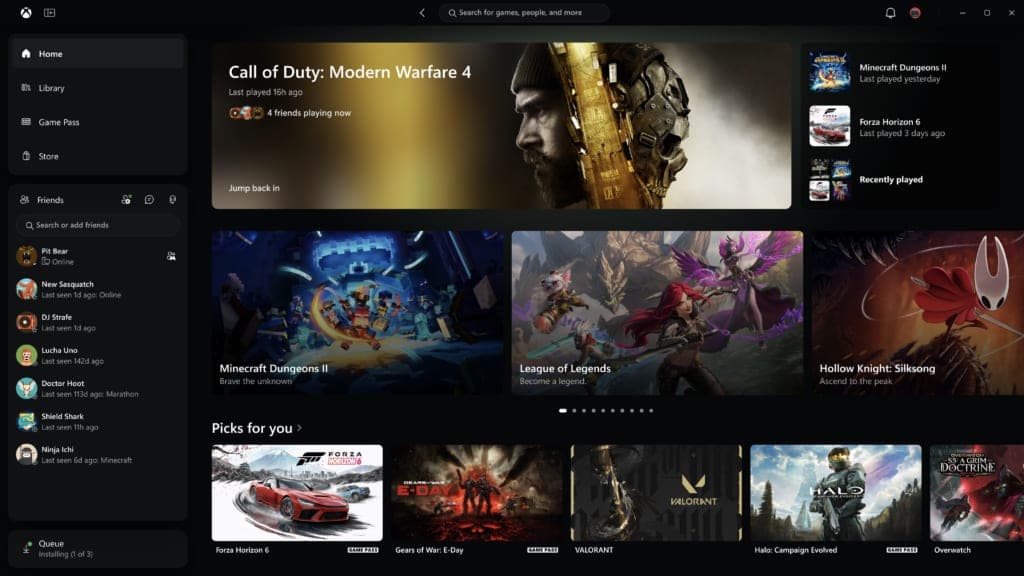
Microsoft is giving Xbox Insiders a redesigned PC app with faster loading, a simpler library and friends built into the main menu. A matching cloud gaming refresh is coming to more players.

Tide
Wave
Sci-fi
3/10
Reality
Shipping
An app that finally opens before your coffee cools.How we rate
Xbox announced a redesigned PC app that it says launches up to 60% faster, with Home, Store and Game Pass pages loading up to 50% faster.
Xbox Insiders can test it starting today, and it adds friends to the main menu and search across games and people. It is Microsoft's biggest cleanup of the app since the Xbox Ally handhelds arrived. A matching cloud gaming refresh reaches more players over the next few weeks.
What to know
- Xbox says its redesigned PC app launches up to 60% faster, loads Home, Store and Game Pass pages up to 50% faster, and opens in-app windows up to 65% faster.
- Xbox Insiders can start testing the new app today, with a simpler library, friends in the main menu and search across games and people.
- The refreshed Xbox Cloud Gaming website, with a new Library tab, desktop mode and five high-contrast themes, reaches more players over the next few weeks.
- Updated cloud gaming apps are also starting to appear on supported TVs and VR headsets.
Xbox announced a redesigned PC app on Thursday that it says launches up to 60% faster than before. So why did a gaming app need a speed makeover in the first place?
What is new in the Xbox PC app?
Starting today, members of the Xbox Insider program can test the updated app. Insiders are players who sign up to try features early and send feedback before everyone else gets them.
Xbox lists five main changes:
- Speed: the app launches up to 60% faster than the current version.
- A simpler library: new navigation, updated filters and new ways to organize your games.
- Friends up front: friends and social tools are now part of the main menu.
- Better search: one search box covers games, including installed titles and add-ons, and people.
- A cleaner look: refreshed game cards, Home screen, Settings and animations.
Xbox says the change is meant to make everyday actions faster and easier. The company also admitted it has "heard where the experience could be better" and that there is more to do.
How much faster is it, really?
Xbox gives three numbers. Each one comes with the same note: they are "up to" figures from its own testing.
- App launch: up to 60% faster.
- Home, Store and Game Pass pages: up to 50% faster.
- In-app windows: up to 65% faster.
By the numbers: if the app used to take 10 seconds to open, a 60% gain would bring that to about 4 seconds. Your own results will differ.
Xbox says the results may vary by device, internet connection, system setup and how you use the app. In plain words, a new gaming laptop will likely feel a bigger jump than an older machine.
Early hands-on tests from October pointed the same way. One tester with a library of more than 1,400 Xbox games said the new build loaded that large collection much faster than the old app. Another tester, who has used the new app for a few weeks on several devices, called it noticeably faster.
Why does the app need to be fast?
The Xbox PC app is where many Windows players find and install games. It is the home of Xbox Game Pass, the monthly subscription that gives you a catalog of games. It also lets you stream console games to a PC over the internet, and it holds your friends list and chats.
That is a lot of jobs for one program. Before this redesign, the app had a reputation for slow loading, especially with big libraries and the store. Early testers noted that the old design mixed ideas from a website and from a desktop program.
The timing matters too. Microsoft launched its Xbox Ally handheld gaming PCs last year. On a handheld you hold a controller, not a mouse, so an app built around mouse clicks feels out of place. The new design aims to feel more like the menu on an Xbox console.
In real life You sit down on the couch with a handheld, tap the Xbox button and want to play your game right now. A slow app and a menu made for a mouse are the two things that get in the way. This update goes after both.
What changes in the library and search?
The library is the part most players touch every day. Xbox says it now has simpler navigation, updated filters and new ways to sort and group the games you own.
Early testers found one more change that helps. The old app split the store and your game list into two places. The new build puts them in one shared layout, and it is easier to tell which games you can install and which you can only stream from the cloud.
Search works wider now. A single search covers games, installed titles, add-ons and other people. That means you can look for a friend and a game from the same box.
Why it matters: fewer separate pages means fewer clicks between "I want to play something" and actually playing.
Where do friends fit in?
Friends and social features now sit in the main navigation. You can see what your friends are playing, start a chat or join a party from there. A party is a voice chat group that lets friends talk while they play.
Before, these tools were easier to miss. Putting them in the main menu fits how many people use Xbox: you often pick a game because someone you know is already playing it.
What is changing in cloud gaming?
The same design is heading to Xbox Cloud Gaming, the service that streams games from Microsoft's servers to your screen. You do not need a powerful PC for it, because the game runs far away and only the video comes to you.
Earlier this year, Xbox invited Insiders to preview a refreshed web version. Over the next few weeks, Xbox will bring it to more players automatically. If you want it right away, go to play.xbox.com.
What the refreshed web version adds:
- A Library tab: it brings together every game you can play through the cloud, whether you own it or get it through Game Pass. You can browse, sort and filter by recently played, genre, input options and more.
- Desktop mode: it uses the space on PCs and larger displays, so you see more games at once.
- Light and dark modes: you pick the one you like.
- Five high-contrast options: these are made to support different visual needs and preferences.
What about TVs and VR headsets?
Xbox says it is "beginning to bring" the refreshed look and navigation to cloud gaming apps on supported TVs and VR headsets. The company does not give a date, and says the designs are not copies of each other.
That is on purpose. Xbox says playing on a PC, a TV or a VR headset is different, and each one needs to work well for its own screen. What stays the same is the basics: finding your games, knowing what you can play and getting into a game quickly.
Early testers add that the PC app is not fully matched with everything else yet. On handhelds, the Game Bar, the overlay that pops up over your game, now looks a bit out of place next to the new app. They understand Microsoft plans to improve that in the coming months.
How do you try it?
If you want the new PC app today, you need to join the Xbox Insider program. Xbox says to download the Xbox Insider Hub for Windows PC, or for Xbox Series X|S and Xbox One, and sign up.
Insiders can send feedback through the Xbox player voice page at aka.ms/XBOXplayervoice, or talk to staff and other testers on the Xbox Insider community on Reddit. Xbox says feedback will keep shaping what comes next.
If you are not an Insider, you have two options. You can wait for the wider release, which Xbox has not dated. Or you can try the new cloud gaming web design at play.xbox.com once it reaches your account.
Test builds can have bugs, so it is wise to be patient if something looks unfinished. Early testers noted that this first release is mostly about speed and ease of use, not a pile of new features.
What it means for you
- PC players: the app you open to launch games should start and load pages faster, if Xbox's numbers hold on your machine.
- Handheld owners: the app is simpler to use with a controller and feels closer to an Xbox console.
- Cloud gamers: a new Library tab collects your cloud games in one place, and five high-contrast themes help readers who need them.
- Everyone else: the wider release has no date yet. Insiders get it first.
The bottom line
Xbox is fixing the part of its PC experience that people use the most: opening the app and finding a game. The speed numbers are Xbox's own, so the real test is how the app feels on your computer. If it lives up to them, a lot of small waits in your day just disappear.
Key facts
- App launch speed
- Up to 60% faster
- Home, Store, Game Pass pages
- Load up to 50% faster
- In-app windows
- Open up to 65% faster
- Who gets it today
- Xbox Insiders on PC
- Web cloud gaming
- Rolling out over the next few weeks
Got questions?
Quick answers, plain wordsWhat is new in the Xbox PC app?
The app launches up to 60% faster, has simpler navigation, a library with updated filters, friends in the main menu, search across games and people, and refreshed game cards, Home and Settings screens.
How much faster is the new Xbox PC app?
Xbox says the app launches up to 60% faster. Home, Store and Game Pass pages load up to 50% faster, and in-app windows open up to 65% faster. Xbox adds that results are based on its own testing and vary by device and connection.
Can I try the new Xbox PC app today?
Yes, if you are an Xbox Insider. Insiders can start testing the updated app starting November 5, 2026. Xbox has not given a date for everyone else.
How do I become an Xbox Insider?
Download the Xbox Insider Hub for Windows PC or for Xbox Series X|S and Xbox One, then join the program. Insiders get early access to new features and can send feedback to Xbox.
What changes in Xbox Cloud Gaming on the web?
A new Library tab shows every game you can play through the cloud, whether you own it or get it through Xbox Game Pass. There is also a desktop mode for big screens, a light and dark mode and five high-contrast options.
When does the new Xbox web experience arrive?
Xbox is bringing it to more players automatically over the next few weeks. If you want it sooner, you can go to play.xbox.com.
Is the redesign coming to TVs and VR headsets?
Yes, in part. Xbox says it is beginning to bring the refreshed look and navigation to Xbox cloud gaming apps on supported TVs and VR headsets. Each one is tuned for its own screen, so they will not look identical.
Does the new app work well with a controller?
That is one of the goals. Xbox simplified the navigation, and early testers say it no longer feels like clicking with a mouse when you use a controller. A setting in Windows 11 Game Mode can make it your default home screen, using controller-sized layouts.
Does the new app add many new features?
Not many yet. Early testers describe this release as mostly about speed and ease of use. The biggest additions are friends in the main menu and search that covers people as well as games.
Is the speed claim guaranteed?
No. Xbox says the numbers come from its own tests and may vary by device, internet connection, system setup and how you use the app.
SourcesXbox Wire
Topics and tagsMicrosoft, xbox, microsoft, gaming
Related stories
Xbox Nano is a $50 controller small enough for your pocket
Microsoft's smallest Xbox controller keeps all 18 standard inputs, adds Bluetooth and a programmable button, and ships in November.
Xbox will turn your game discs digital for free, but sell them and you lose everything
Xbox's Disc to Digital program is now live for everyone, converting eligible physical discs into digital licenses for free, but selling or losing the disc can revoke your access.
Xbox finally has its own version of PlayStation's Platinum trophy
Xbox is rolling out Mythic Achievements to Insiders, a new badge for completing every achievement in a game that's retroactive all the way back to Xbox 360 titles.
More in brief
- Security researchers find proxy traffic exiting the White House networkNov 6
- Bluetooth 7 will be almost four times faster, and lossless audio is nextNov 6
- The FAA is finally retiring floppy disks from air traffic controlNov 5
- Claude can now read your bank accounts with Personal FinanceNov 5
- Aina's $399 AI ring has a screen and a joystick for your agentsNov 5
- China blocks SoftBank's $5.4 billion deal for ABB RoboticsNov 5