
Technology·News & analysis
Apple's $299 HomeView knows your face, but only when your iPhone is home
Apple's first smart display recognizes up to six people by face and gives each one a private Home Screen. The catch: your own iPhone or iPad has to be nearby and recently unlocked.
Tide
Wave
Sci-fi
5/10
Reality
Shipping
A kitchen screen that says hi to you and keeps your texts to itself.How we rate
Apple launched HomeView, a $299 smart display with a 7-inch screen that recognizes up to six people by face and gives each a private Home Screen.
Your messages and calendar appear only when your face matches and your Apple Intelligence-enabled iPhone or iPad is home and recently unlocked. It's Apple's first smart display, built around the new Siri AI. Pre-orders are open in six countries, and deliveries start November 13.
What to know
- Apple announced HomeView, a smart display with a 7-inch square screen, for $299, with pre-orders open now and deliveries starting November 13.
- HomeView recognizes up to six people by face and gives each one a private Home Screen with their own apps and widgets.
- Personal content like Messages and Calendar appears only when your face is recognized and your paired iPhone or iPad is present and recently unlocked.
- Camera and microphone data is processed in Secure Exclaves on the A18 chip, which Apple says even Apple can't access.
Apple introduced HomeView on Tuesday, its first smart display for the home, for $299. The headline trick: it recognizes your face and turns a family screen into your own screen.
Now the fun part. How does a kitchen gadget know it's really you, and not your brother holding up your photo?
First, what is HomeView?
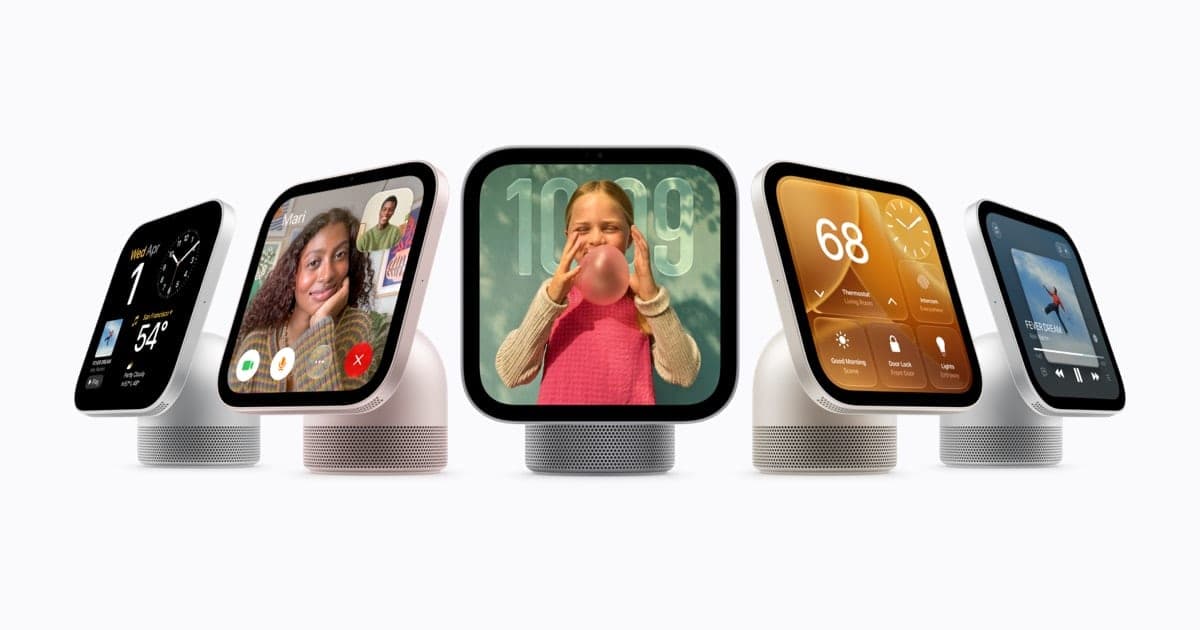
HomeView is a 7-inch square screen that lives on a counter, a nightstand or a wall. Apple calls it "central to the home and personal to everyone in it."
It plays music, makes FaceTime calls, shows your calendar, controls smart home gear and acts as a digital photo frame. It runs on Apple's A18 chip, and its brain is Siri AI, the new, more conversational version of Siri.
Here's the hardware, from Apple's announcement:
- Screen: a 7-inch Liquid Retina display with True Tone.
- Brightness: from 500 nits, enough for a sunny room, down to 0.3 nits for the nightstand.
- Camera: a Center Stage camera that keeps people framed on FaceTime calls, even when they move around.
- Sound: two full-range drivers in the display, plus a down-firing woofer and two force-cancelling passive radiators in the base.
- Colors: silver, starlight, rose pink and space gray for the tabletop model.
The screen also changes with distance. From across the room you see simple information. Step closer and it shows more detail.
How does it know who you are?
HomeView recognizes up to six people by their faces. Each person gets their own Home Screen with their own apps and widgets.
Shared things stay shared. Family photo albums and music can be enjoyed by everyone in the house, including guests. Personal things, like your messages, stay yours.
But a face alone is not enough. Apple's press release says content in apps like Messages and Calendar appears only when two things are true:
- Your face is recognized by HomeView's camera.
- Your paired iPhone or iPad is present and has been recently unlocked.
John Gruber of Daring Fireball asked Apple about this, 9to5Mac reports. Apple's reps told him HomeView does not have Face ID. They said the home is presumed to be a safe space. To be recognized by face or voice, you need a "registered personal device" that supports Apple Intelligence and Siri AI, and it must be on the home's Wi-Fi network.
In real life You walk into the kitchen and HomeView shows your calendar and a new text from your sister. Your iPhone is in your pocket, unlocked a few minutes ago. If you left your phone at the office, HomeView still knows the room, but it keeps your messages to itself.
Your face opens the door, but your own unlocked iPhone or iPad is the key that lets HomeView show anything private.
Why not just use Face ID?
Apple didn't explain the design choice beyond the safe-space point. But the setup works like a two-key lock: the camera does the quick "who's there," and your own device vouches for you.
9to5Mac spotted one more detail in the press release footnotes. Personal context requests need a paired Apple Intelligence-enabled iPhone or iPad running the latest software, with Siri AI turned on and set to a supported language. That means an Apple Watch doesn't count as your personal device here.
The catch: if your iPhone is too old for Apple Intelligence, HomeView can't show your personal content. Apple says you still get Siri AI's broad world knowledge, natural back-and-forth conversations and better music discovery.
What can Siri AI do on it?
Siri AI is Apple's new version of Siri. Apple describes it as "profoundly more capable and conversational," with personal context and onscreen awareness.
With a paired, Apple Intelligence-enabled iPhone or iPad, Siri on HomeView can take action across your apps. It can pull up information from Messages, Calendar and your Apple Music playlists.
Conversations also travel. A chat that starts on HomeView continues in the Siri app on your iPhone, iPad, Mac, Apple Watch or Apple Vision Pro, synced privately through iCloud.
Other things HomeView does around the house:
- Recipes: it turns recipes from the web into step-by-step instructions, with hands-free timers.
- Intercom: it sends a quick voice message to one room or the whole house.
- Find My: it shows family members who share their location and helps find a lost iPhone or AirTag.
- Alarms: it listens for smoke and carbon monoxide alarms and alerts your iPhone, iPad or Apple Watch.
AppleInsider notes there is no App Store on HomeView. It runs Apple's apps plus compatible third-party audio and video apps, and your devices can send it widgets and information.
Where does the camera data go?
This is the part Apple spent the most words on. HomeView and its A18 chip use Secure Exclaves: walled-off zones that process camera and microphone data separately from the rest of the system.
Apple says data processed there can't be accessed by HomeView's software, by apps, by the user, or by Apple. Siri requests run either on the device or in Private Cloud Compute, Apple's cloud system, where Apple says data isn't stored or made accessible to anyone.
The big picture: a screen with a camera that sits in your kitchen is a lot to ask of trust. Apple's answer is to keep the face matching inside the chip and the personal data tied to your own phone.
What about the rest of the smart home?
HomeView is also a control panel. You can lock doors, adjust the thermostat, dim the lights or close the blinds by touch or by voice.
- Home Camera face: streams up to nine camera feeds at once.
- Home Modular face: gives quick access to your favorite accessories.
- Smart recognition: with a supported iCloud+ plan and compatible cameras, it recognizes people, familiar faces, pets, packages and vehicles, with end-to-end encryption.
- Video descriptions: it summarizes what happened in a HomeKit Secure Video clip, so you don't have to watch it.
It works with the new Apple Home Collection, a lineup of cameras, thermostats and a lock designed with LG Electronics and Schneider Electric, plus other Matter accessories. We wrote about the early reports on the hub and its camera when the October 13 date leaked.
What does it cost, and where can I buy it?
By the numbers:
| Item | Price (US) |
|---|---|
| HomeView (tabletop) | $299 |
| HomeView (Wall Mounted) | $299 |
| Power Mount USB-C Wall Connector | from $59.95 |
| Power Mount AC Wired | from $79.95 |
| Power Mount PoE Wired (early 2027) | $129.95 |
The mounts come from Schneider Home, 9to5Mac reports. The wall model comes in space gray and silver.
Pre-orders are open in Australia, Canada, India, New Zealand, the UK and the US. Singapore pre-orders start Thursday, October 15. Both models arrive on Friday, November 13.
What's next: HomeView isn't coming to the European Union for now. 9to5Mac reports that's because Siri AI isn't available there, and Apple says it's working with the EU to find a path forward.
On the green side, Apple says the base and the wall model's enclosure use 100% recycled aluminum. More on Apple's other launches lives on our Apple page.
What it means for you
- Pre-ordering? Check your iPhone first. Without an Apple Intelligence-enabled iPhone or iPad, you get Siri AI but not your messages, calendar or personal requests.
- Sharing a home: up to six people can have their own Home Screens. Each person needs their own paired, supported device to see private content.
- Leaving your phone behind means HomeView stays in "household" mode, even if it sees your face.
- Wall mounting costs extra: plan on at least $59.95 for the mount on top of the $299 display.
The bottom line
HomeView is Apple's bet that one screen can serve a whole family and still keep each person's stuff private. The face recognition is the friendly part, but your own unlocked iPhone or iPad is what actually unlocks your data. Deliveries start November 13.
Key facts
- Price
- $299 (tabletop or wall-mounted)
- Display
- 7-inch Liquid Retina, 500 to 0.3 nits
- People it recognizes
- Up to six
- Chip
- A18 with Secure Exclaves
- Availability
- Friday, November 13, 2026
Got questions?
Quick answers, plain wordsWhat is Apple HomeView?
It's Apple's smart display for the home. It has a 7-inch square screen, speakers, a camera and Siri AI, and it handles music, FaceTime calls, messages, recipes and smart home controls.
How much does HomeView cost?
$299 in the US for either the tabletop model with a speaker base or the wall-mounted model. The wall model needs a separate mount from Schneider Home, starting at $59.95, 9to5Mac and AppleInsider report.
When can I get one?
Pre-orders opened on October 13, 2026 in Australia, Canada, India, New Zealand, the UK and the US. Both models arrive on Friday, November 13. Singapore pre-orders start October 15.
How does HomeView's face recognition work?
It can recognize up to six people by face. For personal content to appear, Apple says your face must be recognized and your paired iPhone or iPad must be present and recently unlocked. John Gruber of Daring Fireball reports that device must be on the home's Wi-Fi network.
Does HomeView have Face ID?
No. Daring Fireball's John Gruber reports that HomeView does not have Face ID. It uses its Center Stage camera plus the presence of your own unlocked iPhone or iPad to decide it's really you.
Can my Apple Watch count as my device?
No. Apple's press release footnote says personal context requests need a paired Apple Intelligence-enabled iPhone or iPad with Siri AI turned on. 9to5Mac notes that rules out the Apple Watch.
Can I use HomeView without an Apple Intelligence iPhone?
Yes, with fewer features. Apple says people without an Apple Intelligence-enabled iPhone or iPad still get Siri AI's world knowledge, natural conversations and better music discovery, just not their personal content.
Is HomeView available in Europe?
Not for now. 9to5Mac reports HomeView isn't available in the European Union because Siri AI isn't available there, and Apple says it's working with the EU on a path forward.
Does HomeView have an App Store?
No. AppleInsider reports there's no App Store on HomeView. It runs Apple's apps plus compatible third-party audio and video apps, and your devices can send it information and widgets.
Can Apple see what HomeView's camera sees?
Apple says camera and microphone data is processed in Secure Exclaves on the A18 chip and can't be accessed by HomeView's software, apps, the user or Apple. Siri requests run on the device or in Private Cloud Compute, where data isn't stored.
SourcesApple
Topics and tagsApple, Smartphones, apple, smart home
Related stories
Apple's smart home hub reportedly launches October 13, with a camera that never records video
Bloomberg's Mark Gurman says Apple will announce its long-rumored smart home display on October 13. He also describes a companion home camera that sends text descriptions instead of video.
Apple is tightening Mac 'Full Disk Access' because of AI agents
Apple says some apps use the powerful macOS permission in risky ways, and that AI agents make the danger bigger, so granting it will soon take very explicit user action.
GrayKey maker reportedly found a way around the iPhone's Inactivity Reboot
A leaked training video seen by 404 Media says Magnet Forensics' new tools keep a seized iPhone in an easier-to-search state, even after the reboot Apple added in iOS 18.1.
More in brief
- Anthropic tells investors its Q3 revenue hit $16.8 billion ahead of its IPOOct 15
- Mexico gives Meta, TikTok and X one month to shield kids from harmful contentOct 15
- OpenAI engineer charged over hidden recording device in executive roomOct 15
- Eight US states sue OpenAI over ChatGPT's safety for kidsOct 14
- Xbox Nano is a $50 controller small enough for your pocketOct 14
- Linux kernel developers move to drop the rule that made coders disclose AI helpOct 14